

Run SQL
A Query Tool runs what is in its editor: a selection, one statement, or the whole tab. pgjumbo splits the text into statements, sends them one after another on the tab’s own session, and gives each statement that returns rows a result tab of its own.
Every way to run
Section titled “Every way to run”The toolbar’s Run button runs the selection, or the whole tab when nothing is selected. The ⌄ beside it (More ways to run) has the others.
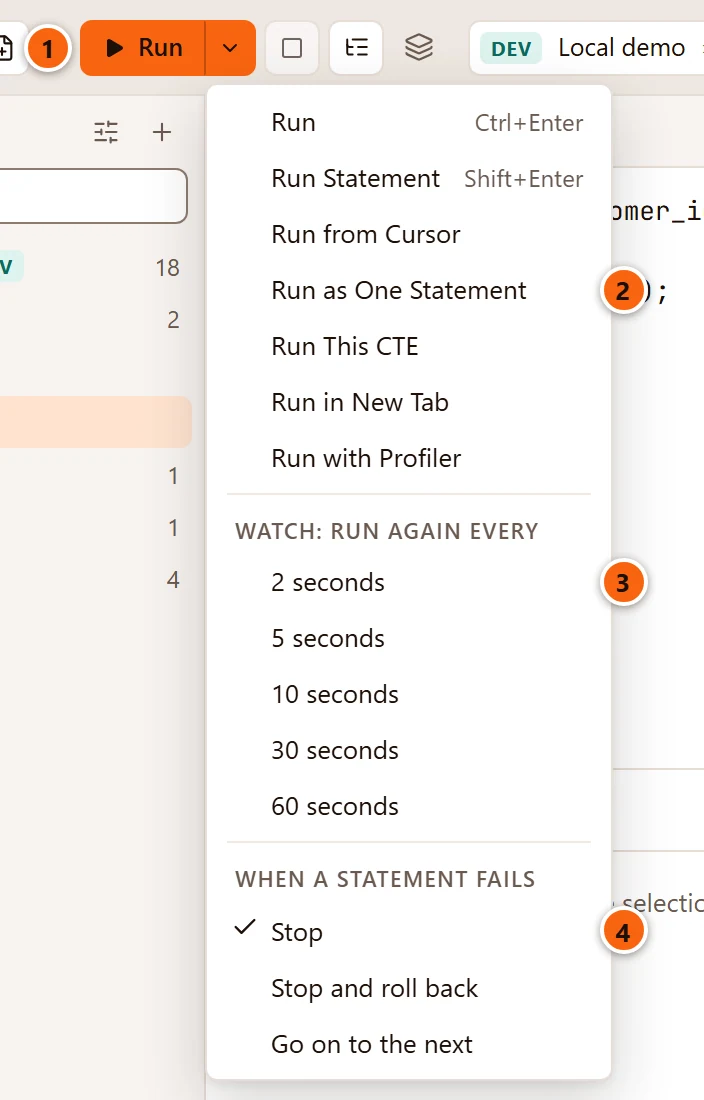
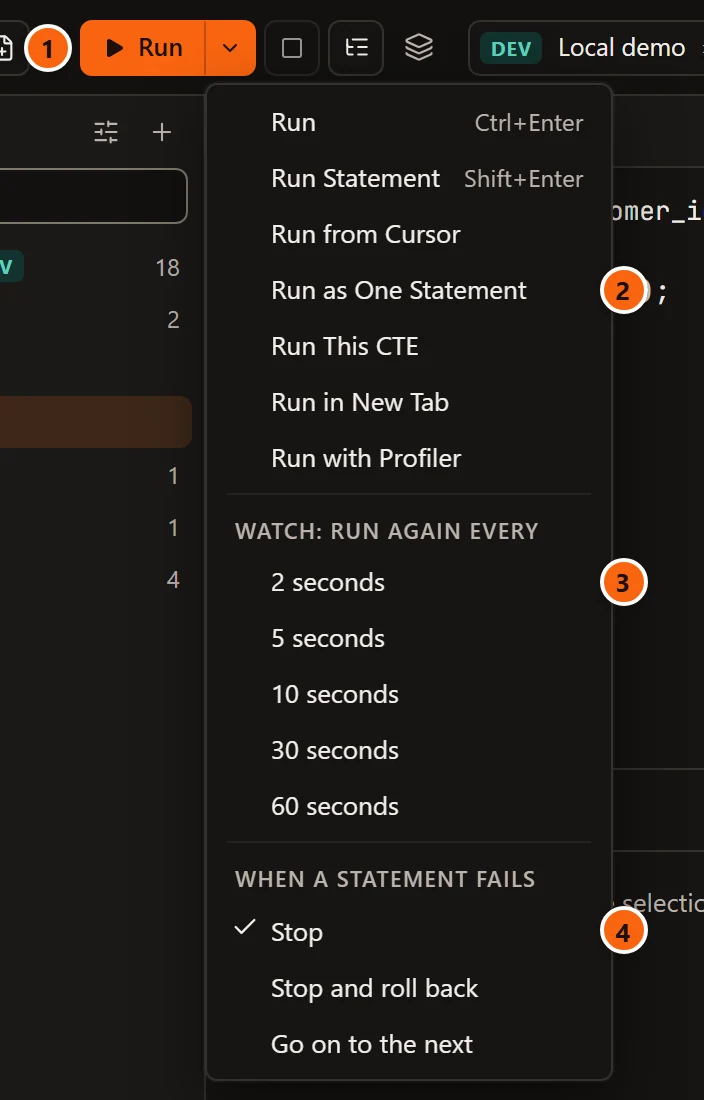
- 1 Run and its ⌄. The menu is greyed while a query runs and while the tab has no session.
- 2 The ways to run. The table below says what each one takes from the editor.
- 3 Watch: run again every starts a watch at that interval. See Watch a query.
- 4 When a statement fails says what the rest of a script does after an error. See When a statement fails.
| Command | Keys | What runs |
|---|---|---|
| Run | ⌘ ↩︎ (Ctrl+Enter on Windows and Linux) | The selection, or the whole tab when nothing is selected. |
| Run Statement | ⇧ ↩︎ (Shift+Enter on Windows and Linux), in the editor only | The selection, or the statement at the cursor. |
| Run from Cursor | From the statement at the cursor, or the first one after it, to the end of the tab. | |
| Run as One Statement | What Run would run, sent to the server unsplit. | |
| Run Script | ⇧ ⌘ ↩︎ (Ctrl+Shift+Enter on Windows and Linux), or F5 in the editor | The whole tab, even when something is selected. |
| Run This CTE | One common table expression of a WITH query, on its own. See Run This CTE. |
|
| Run in New Tab | The selection, or the statement at the cursor, in a new tab. See Run in New Tab. | |
| Run with Profiler | What Run would run, with each line of the PL/pgSQL functions it calls timed. See Run with Profiler. | |
| Run on Several Databases… | The selection or the whole tab, on databases you tick. See Run on several databases. |
Where each one is:
- All of them are in the Query menu. Run Script is only there.
- Run Statement is also in the toolbar’s ··· menu, and so is Run on Several Databases…, which has a toolbar button of its own too.
- The editor’s right-click menu has Run Selection or Run All (what Run would run), Run Statement and Run This CTE.
Things worth knowing about each:
- ⇧ ↩︎ (Shift+Enter on Windows and Linux) runs only from the editor. Anywhere else it does what it always does.
- Running an empty tab, or a selection of nothing but spaces, does nothing. Pressing Run again while a run starts does not start a second one.
- Run from Cursor with no statement at the cursor or after it says
Nothing to run from the cursor: no statement starts there or after it. - Run as One Statement is for when the split is not what you meant. PostgreSQL then runs the whole text as one implicit transaction, and pgjumbo does not ask for parameters: the text goes as written.
These messages, like most of the tab’s short notices, show beside the result tabs for a few seconds. Keep the pointer on one to hold it.
What Ctrl+Enter runs
Section titled “What Ctrl+Enter runs”⌘ ↩︎ (Ctrl+Enter on Windows and Linux) is Run’s key unless you say otherwise. SettingsKeyboardShortcutsCtrl+Enter runs has two choices: Selection or all (the default) and Statement at cursor, which makes the key run what Run Statement runs, as DataGrip does. The toolbar’s Run button and the menu item still run the selection or the whole tab. The same page has presets that bring the keys of SSMS, DataGrip and pgAdmin, and lets you give any command your own key. See Change the shortcuts.
Where a statement ends
Section titled “Where a statement ends”pgjumbo splits what it runs into statements and sends them one at a time, in order. A statement ends at:
- A semicolon, as in psql.
- A blank line, which psql does not do: statements written without semicolons, a blank line apart, run one by one.
- The start of the next statement on a line of its own, as SSMS reads a script. PostgreSQL’s parser decides:
select 1followed byselect 2on the next line is two statements, whileINSERT INTO tfollowed bySELECT …is one.
None of the three counts inside a string, a quoted name, a dollar-quoted body, a comment, parentheses or a
BEGIN ATOMIC … END function body. A line that starts with a backslash is one psql command, which pgjumbo answers
itself; see psql commands in the editor.
The statement at the cursor
Section titled “The statement at the cursor”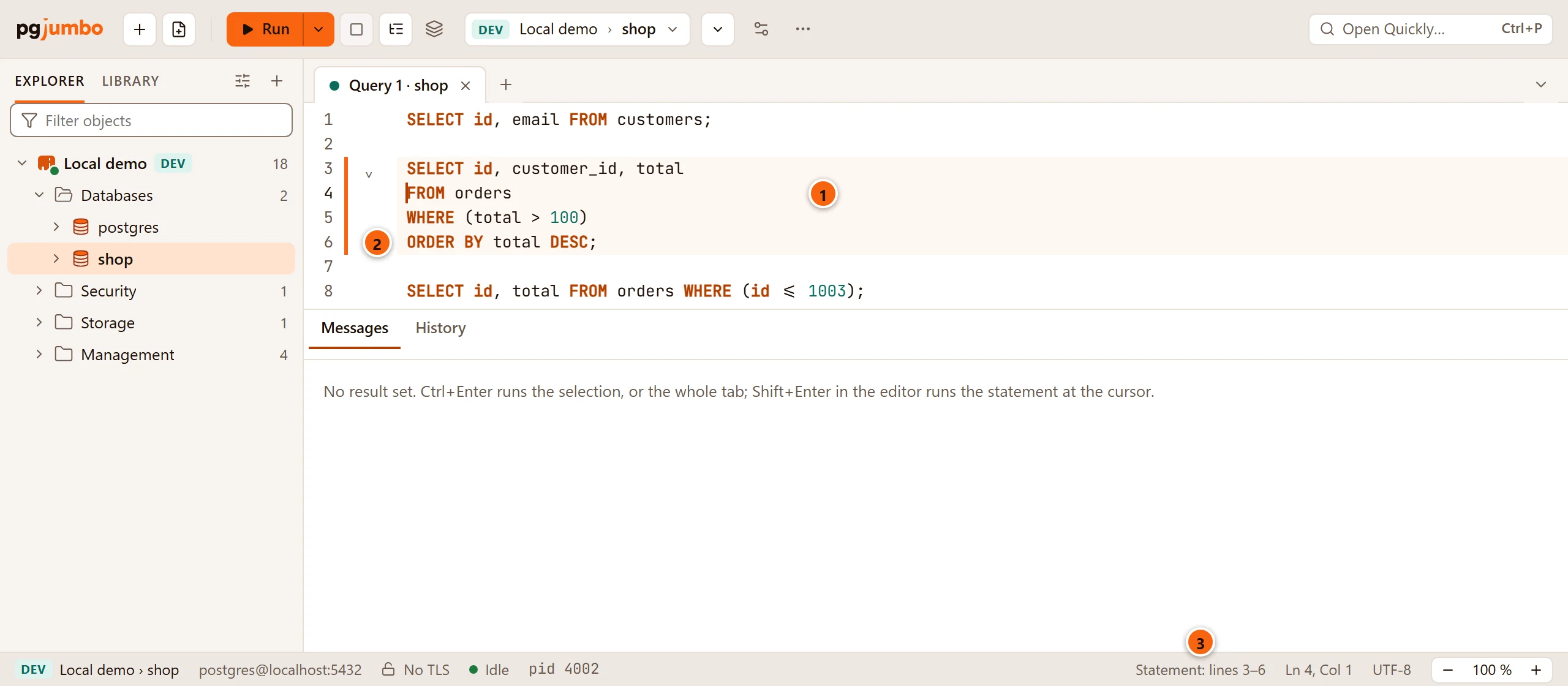
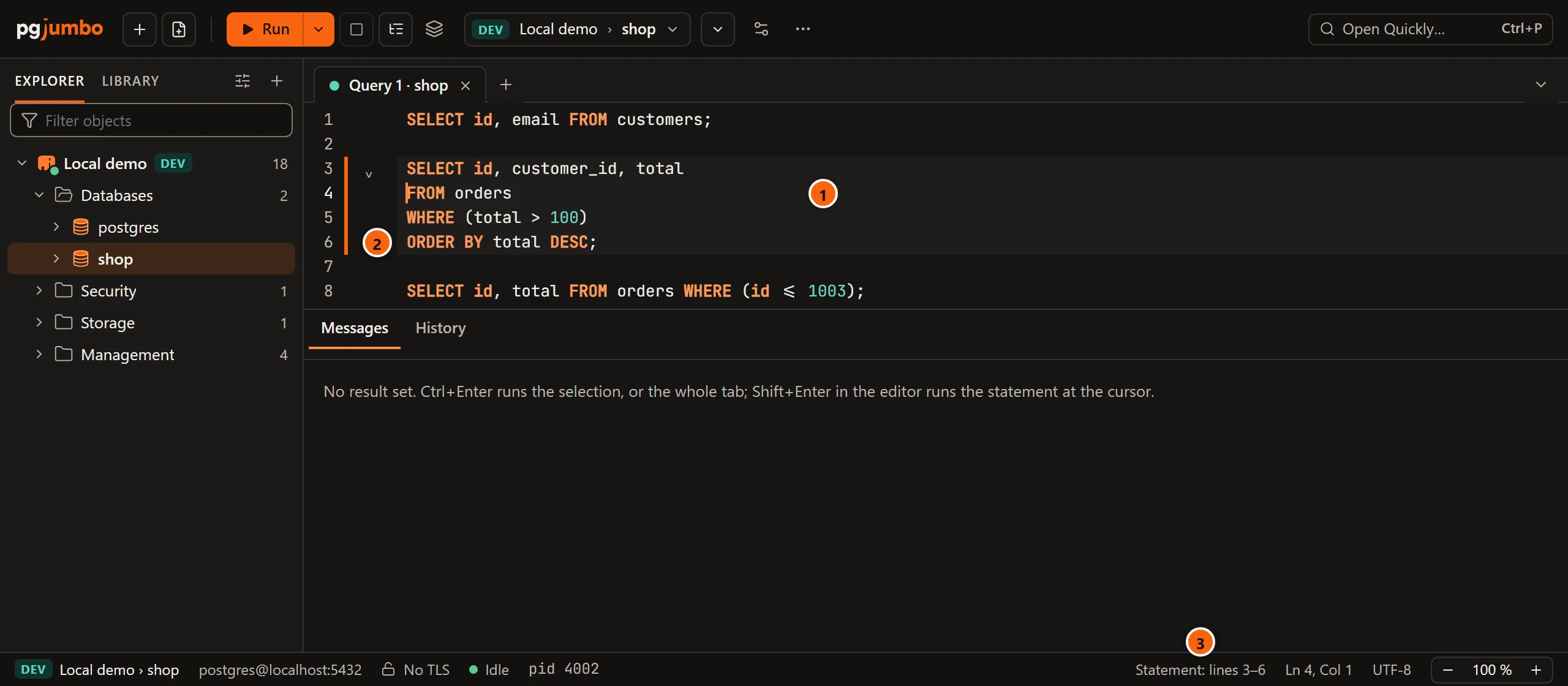
- 1 While the editor has the focus, the lines of the statement at the cursor are lit.
- 2 A bar beside them marks the same lines.
- 3 The status bar names them:
Statement: lines 3–6, orStatement: line 8for a statement on one line. A window 1,100 pixels wide or narrower leaves this out.
That statement is what Run Statement, Run in New Tab and Explain take. It is the statement the cursor is in, or the one that ends on the cursor’s line (the cursor after its semicolon or in a comment after it), or the one that starts on the cursor’s line (the cursor in its indentation).
On a blank line, or on a comment line of its own, the cursor is in no statement. Nothing is lit, the status bar says
No statement at the cursor, and Run Statement runs nothing: the tab says
No statement at the cursor: put the cursor in one, or select what to run. It never takes the statement above.
After a run
Section titled “After a run”Each statement that returns rows gets a Data Output tab of its own (Data Output 1, Data Output 2 and so on when there are several), and the first one comes forward. A new run replaces the results of the last one, except those you pinned. Messages lists every statement with its command tag and time. See The results grid and Keep and compare results.
Every run also goes into the server’s query history.
Two things never reach the server as written:
- A line that starts with a backslash. pgjumbo answers
\d,\dt,\x,\setand a dozen more itself and says so for the rest; see psql commands in the editor. COPY … FROM STDINandCOPY … TO STDOUTneed a file on your computer, which the Query Tool does not provide. pgjumbo ends the copy and the statement fails withCOPY … FROM STDIN and COPY … TO STDOUT need a file on this computer, which the Query Tool does not provide. Use COPY with a file on the server, or \copy in psql.To copy a table’s rows to or from a file on your computer, use Import and export table data, or\copyin the PSQL Tool.
What pgjumbo asks before a run
Section titled “What pgjumbo asks before a run”Most runs start at once. These wait for you first, and nothing is sent until you answer:
| When | What you see | Explained in |
|---|---|---|
The SQL has parameters such as :name or $1 |
The Values for this query dialog | Parameters |
| A destructive statement on a server tagged Production (or Staging, when you set it so) | A confirmation that lists the statements | Production servers |
| A read on Staging or Production that would cost more than your threshold | A line under the editor with Run anyway | Before a statement runs |
In Smart or Manual commit, a command PostgreSQL runs only outside a transaction, such as VACUUM |
A question with Run Now | Transactions |
| Rows of a result changed and not saved | A question, because a run replaces the results | Edit data |
| A rehearsal waiting for its Commit or Roll Back | A rehearsal is waiting: Commit or Roll Back it first. |
Rehearse a write |
Whether a run commits by itself depends on the tab’s commit mode; see Transactions.
When a statement fails
Section titled “When a statement fails”When a statement fails, at the bottom of Run’s ⌄ menu, decides what the rest of a script does after an error. Each tab keeps its own choice, and a new tab starts with Stop.
| Choice | What happens |
|---|---|
| Stop | The run stops at the statement that failed. The statements after it are not sent. What ran before it stays done. |
| Stop and roll back | All or nothing: the run stops, and nothing it changed stays. In Auto-commit the run gets a transaction of its own; inside a transaction that is already open, a savepoint. Messages then says Rolled back: nothing this run changed stays, as this tab's "When a statement fails" asks. |
| Go on to the next | The rest still runs. Inside a transaction each statement runs under a savepoint of its own, as psql’s ON_ERROR_ROLLBACK does, so one failure does not fail the others. |
Stop and roll back cannot undo a script that runs its own BEGIN and COMMIT: the transactions that ended
before the failure stay, and Messages says so
(Nothing to roll back: the script runs its own transactions, and those that ended before the failure stay.).
With Stop, a script of three statements whose second fails looks like this:
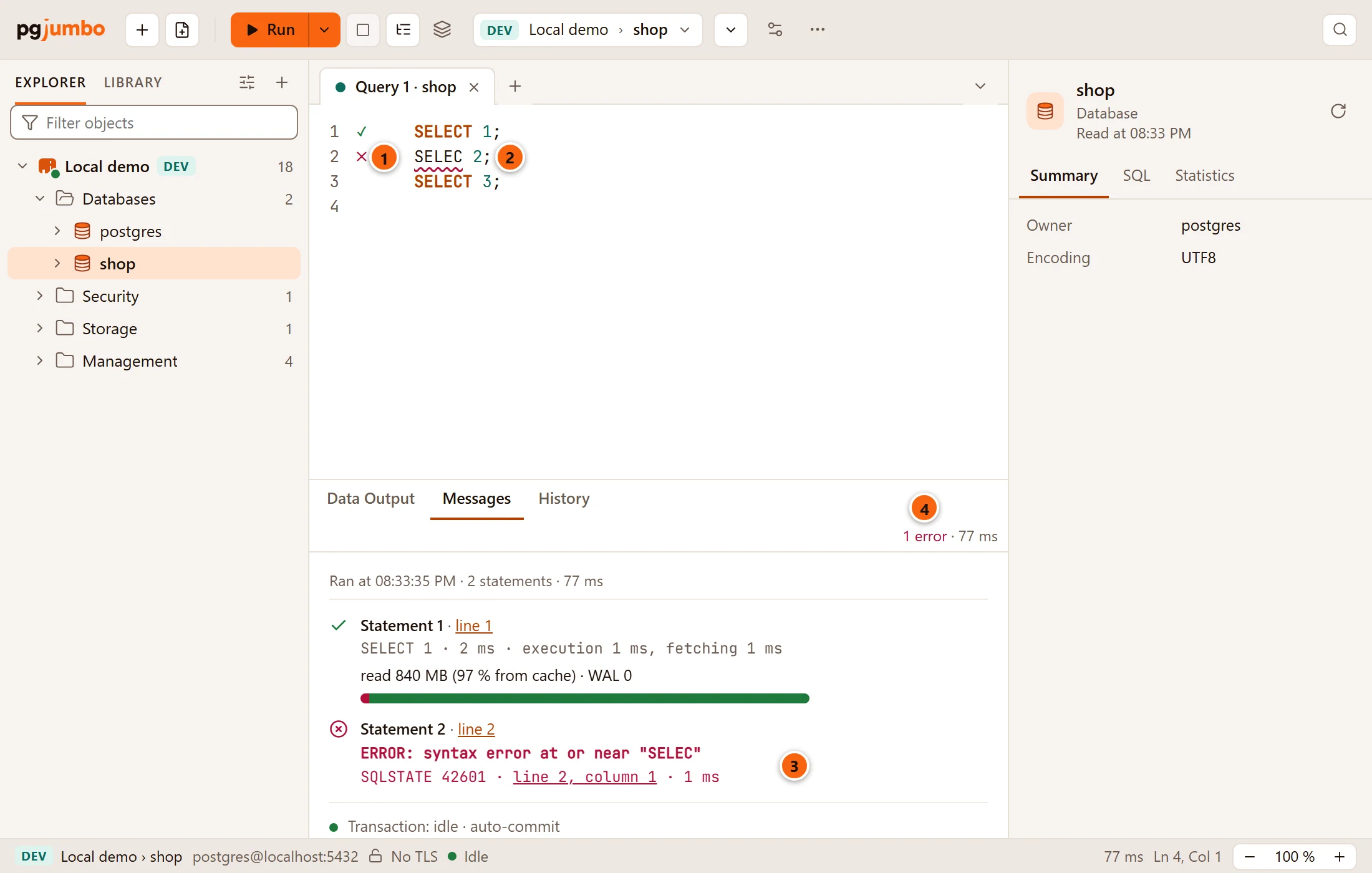
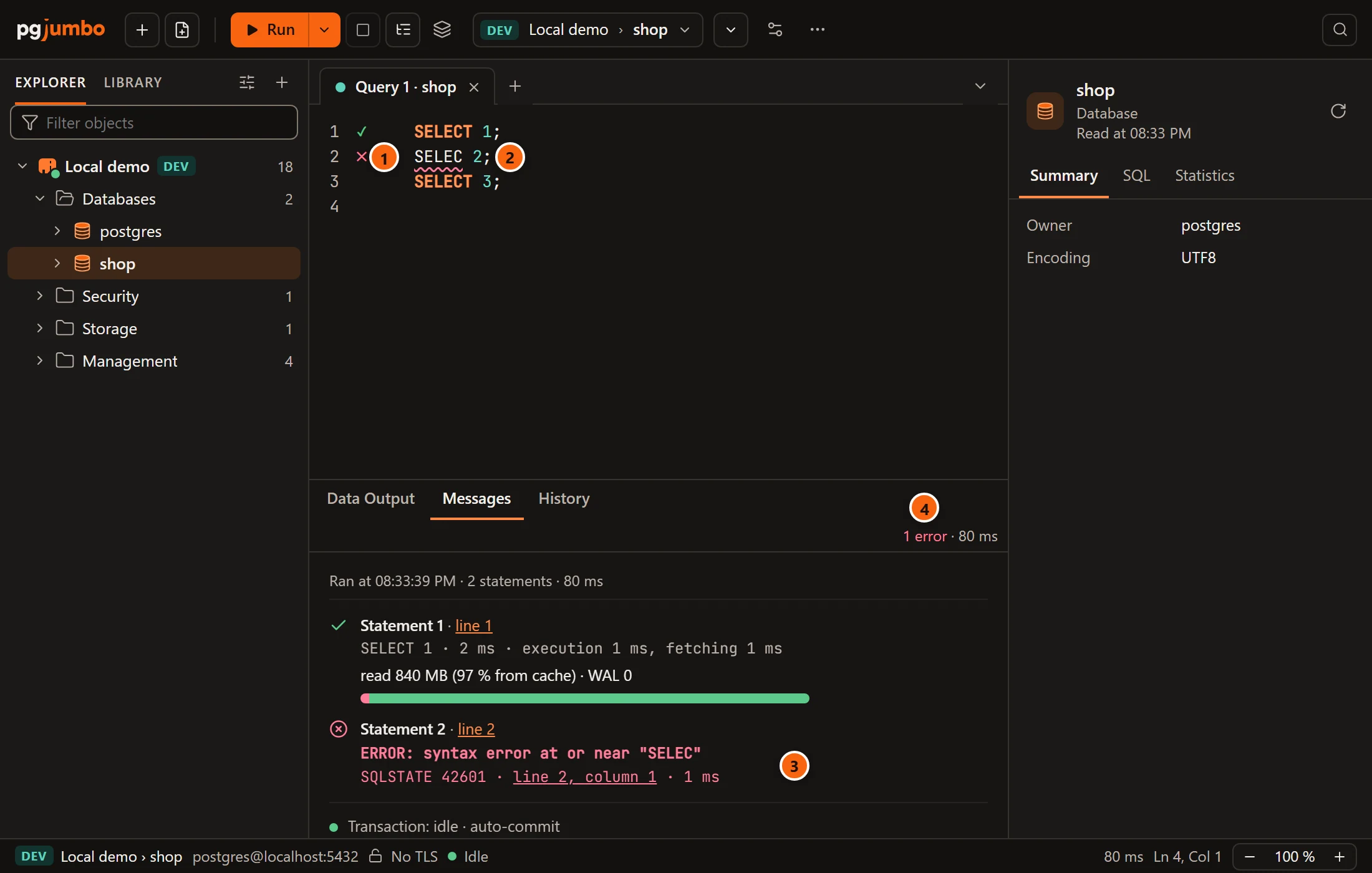
- 1 A cross beside the statement that failed. The first statement has a check; the third has no mark, because it never ran.
- 2 The place PostgreSQL reported is underlined. The underline goes as soon as you change the text.
- 3 Messages shows PostgreSQL’s error with its SQLSTATE and a link to its line and column. The results grid explains every part of it.
- 4 Beside the result tabs, how many statements failed.
With Go on to the next, the statement after the failure runs too:
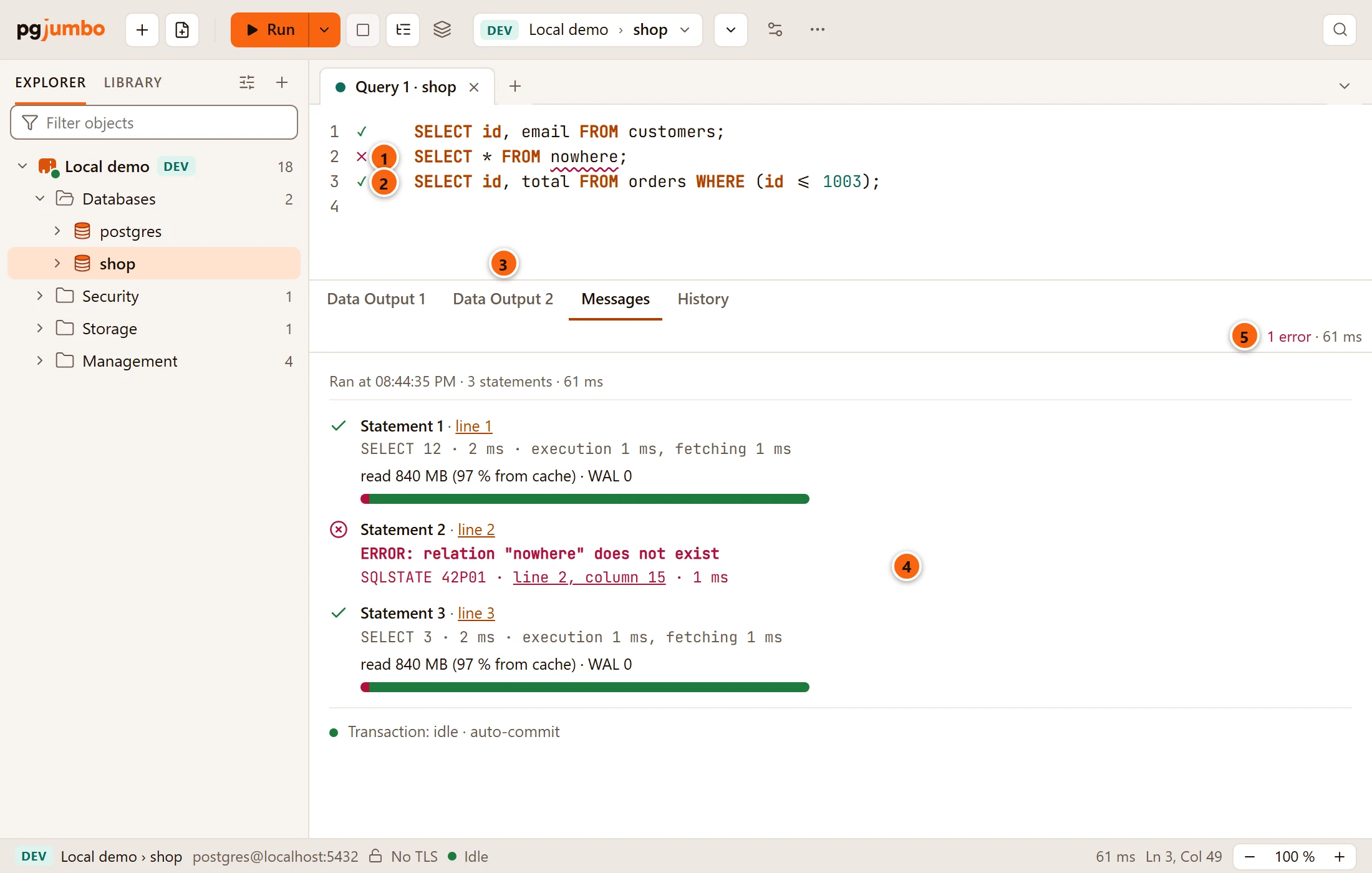
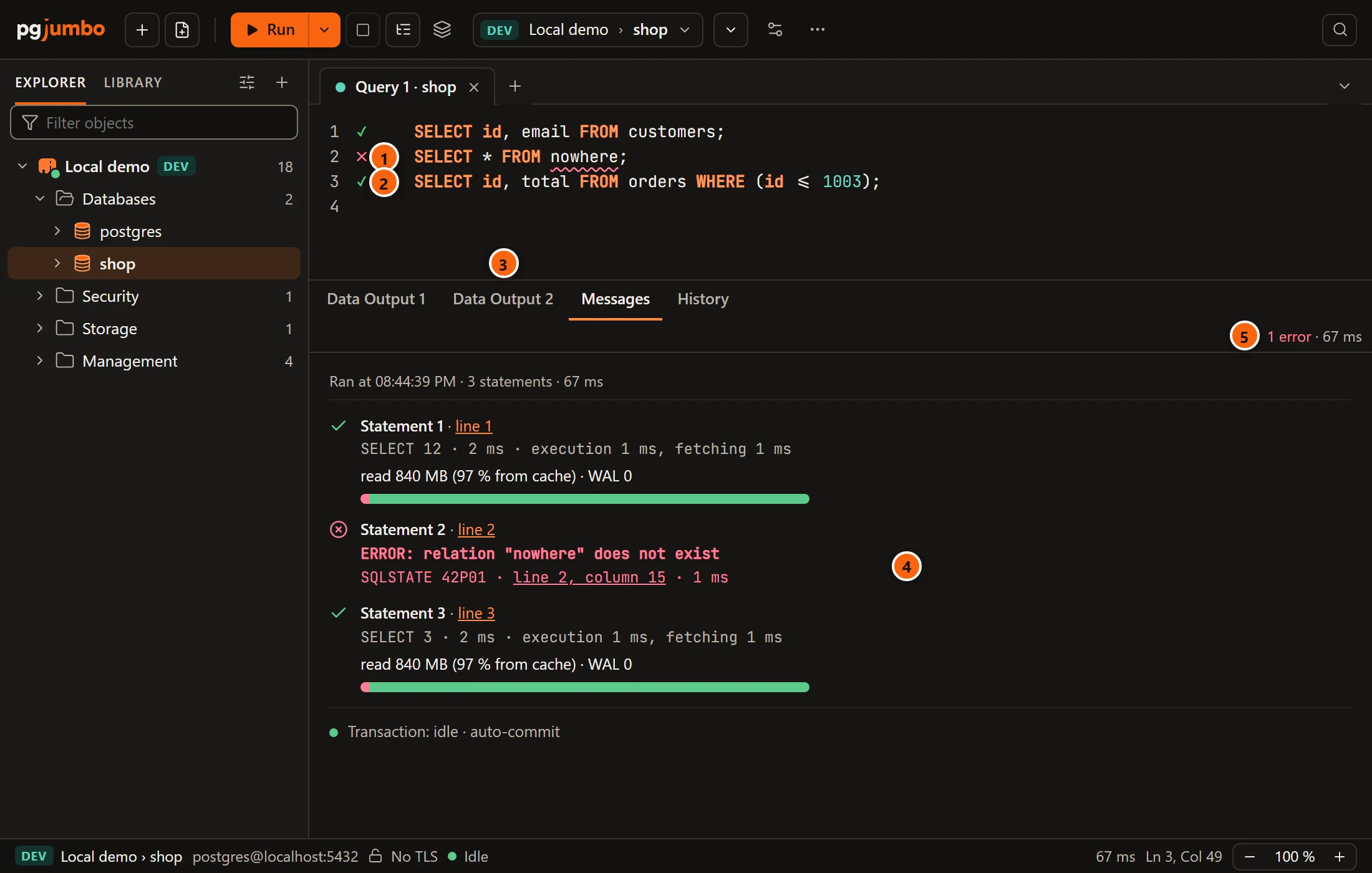
- 1 The statement that failed.
- 2 The statement after it ran all the same.
- 3 Its rows have their own result tab.
- 4 The error, between the two statements that succeeded.
- 5 The count of errors beside the result tabs.
What a failure does to a transaction that is open, in Smart or Manual commit, is a subject of its own; see The Transaction view. When the Assistant is on, Messages offers to fix a failed statement; see SQL help in the editor.
Follow a running script
Section titled “Follow a running script”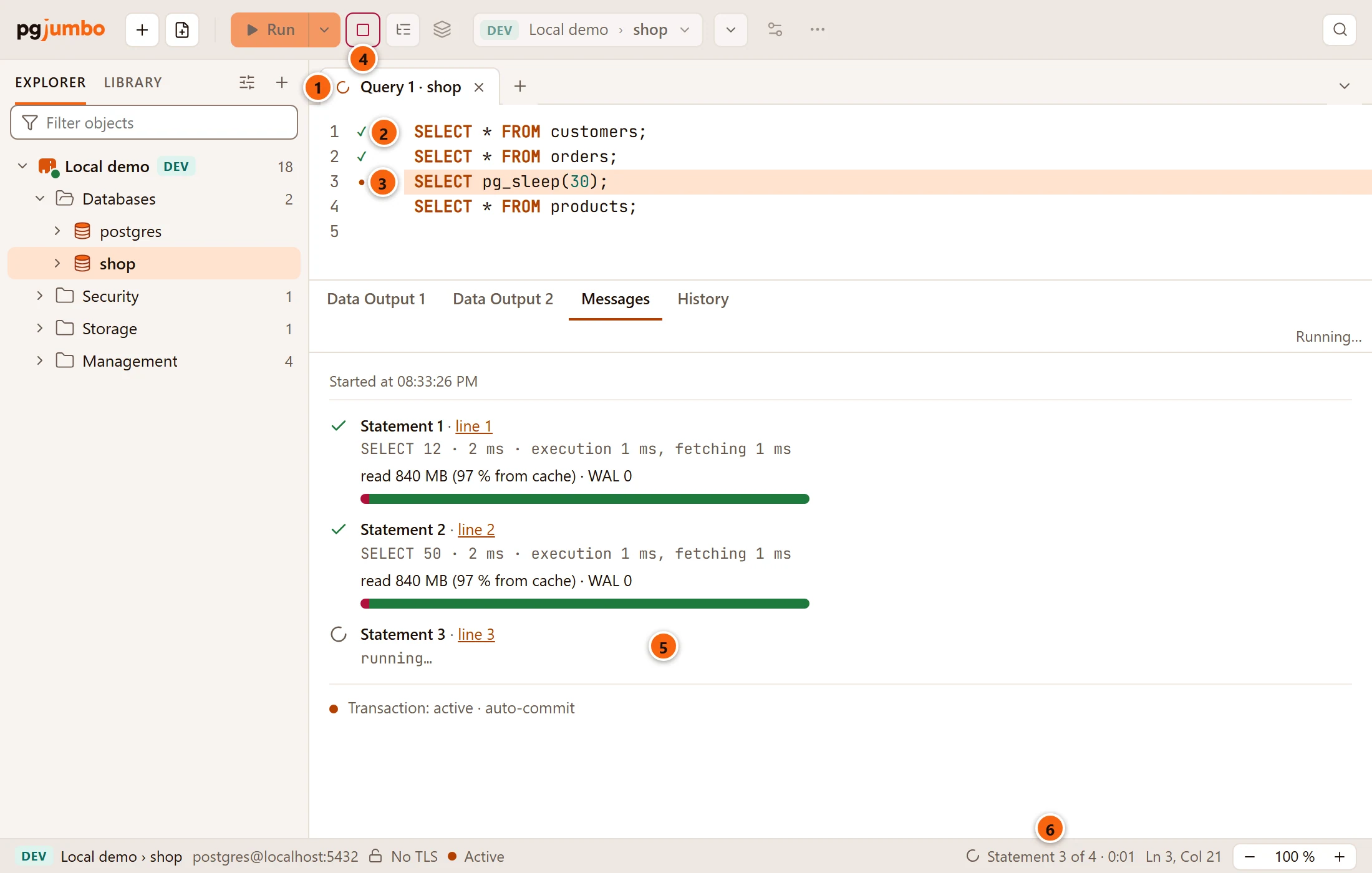
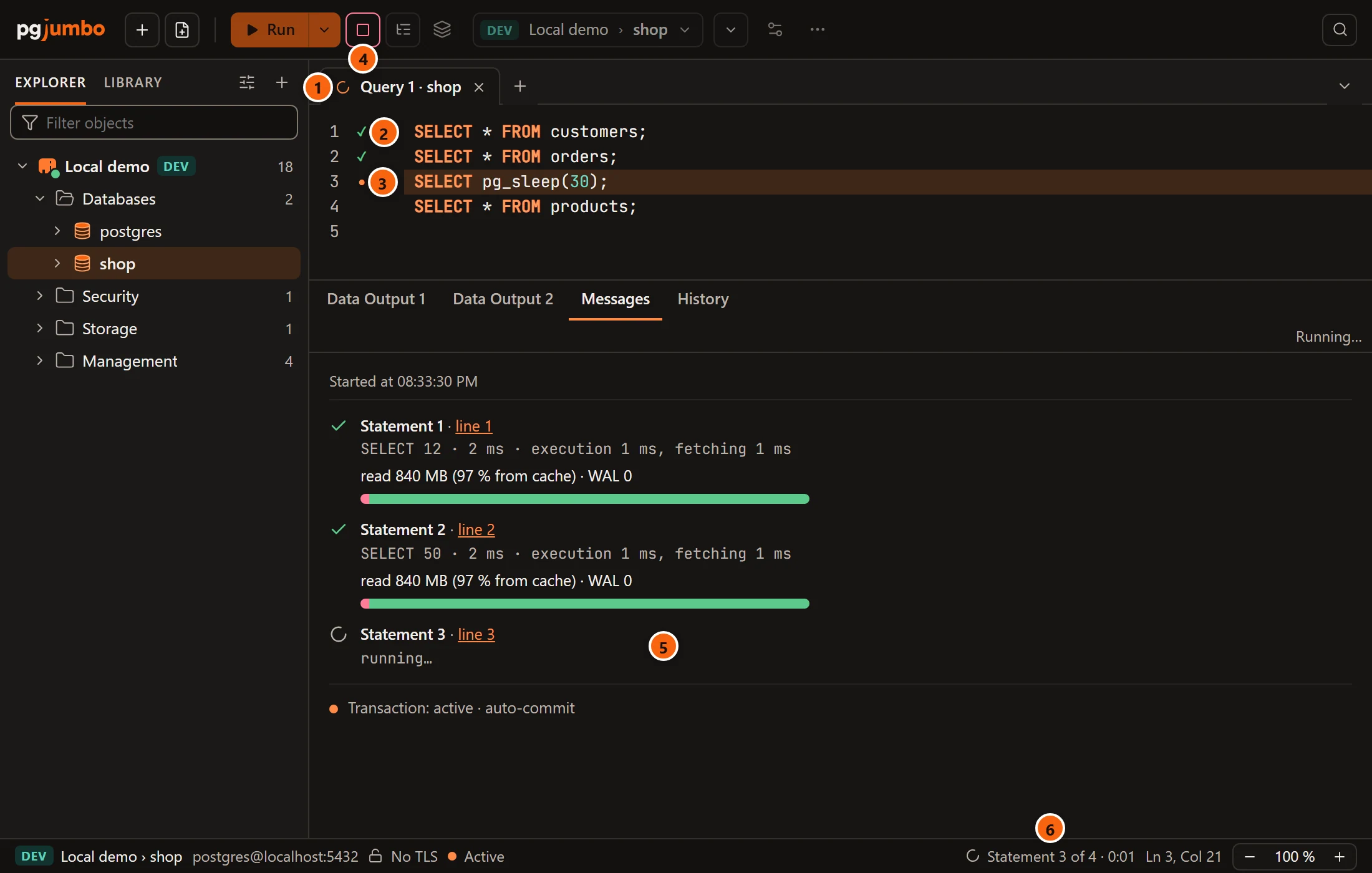
- 1 The tab shows a spinner in place of its dot while it runs, so a run behind another tab is easy to see.
- 2 A check beside each statement that has finished. Hover it to see the statement’s number, its command
tag and its time, for example
Statement 1 · SELECT 12 · 2 ms. - 3 A dot beside the statement running now, whose lines are highlighted. A statement that failed gets a cross. When several statements share a line, the worst mark shows and its tooltip lists each of them.
- 4 Stop is red while something runs.
- 5 Messages starts with
Started atand the time, then lists the statements as they start and finish; the running one saysrunning…. Each statement’s line link puts the cursor on it. - 6 The status bar shows which statement is running, out of how many, and for how long:
Statement 3 of 4 · 0:01.
The marks stay on their statements while you edit the text, and the next run replaces them. Beside the result tabs the run says Running… until it ends. The line under each finished statement that says what it read and wrote is explained in Footprint and tips.
While a script runs, the editor scrolls to each statement as it starts. To leave the editor where you put it, turn off SettingsRunning queriesWhile a script runsFollow the running statement. See Settings.
The progress of long commands
Section titled “The progress of long commands”For a statement that PostgreSQL reports progress for, the status bar also shows the command, its phase and how far it
is, as the server reports it: a percentage and a bar when the total is known (for example
CREATE INDEX · building index: scanning table · 42 %), otherwise the blocks, tuples or bytes done so far. This
works for CREATE INDEX, REINDEX, VACUUM, VACUUM FULL and CLUSTER; for ANALYZE from PostgreSQL 13; and for
COPY from PostgreSQL 14. pgjumbo reads it once a second. When the server names the table, hovering the item shows
it. Activity shows the same for every session of the server.
Stop a query
Section titled “Stop a query”Click Stop, choose QueryStop, or press ⌘ . (Ctrl+. on Windows and Linux). In the editor, Shift+F5 stops too.
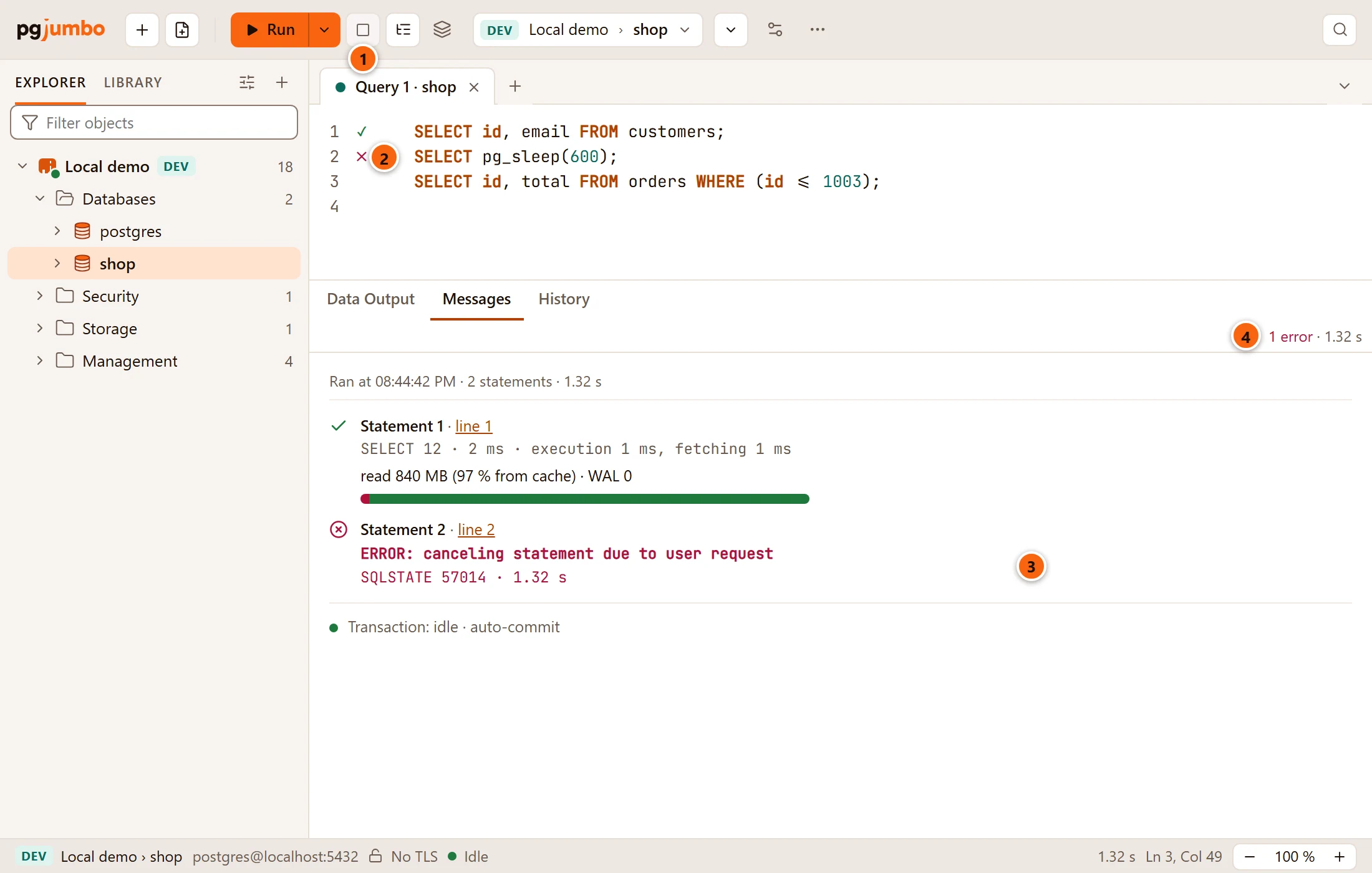
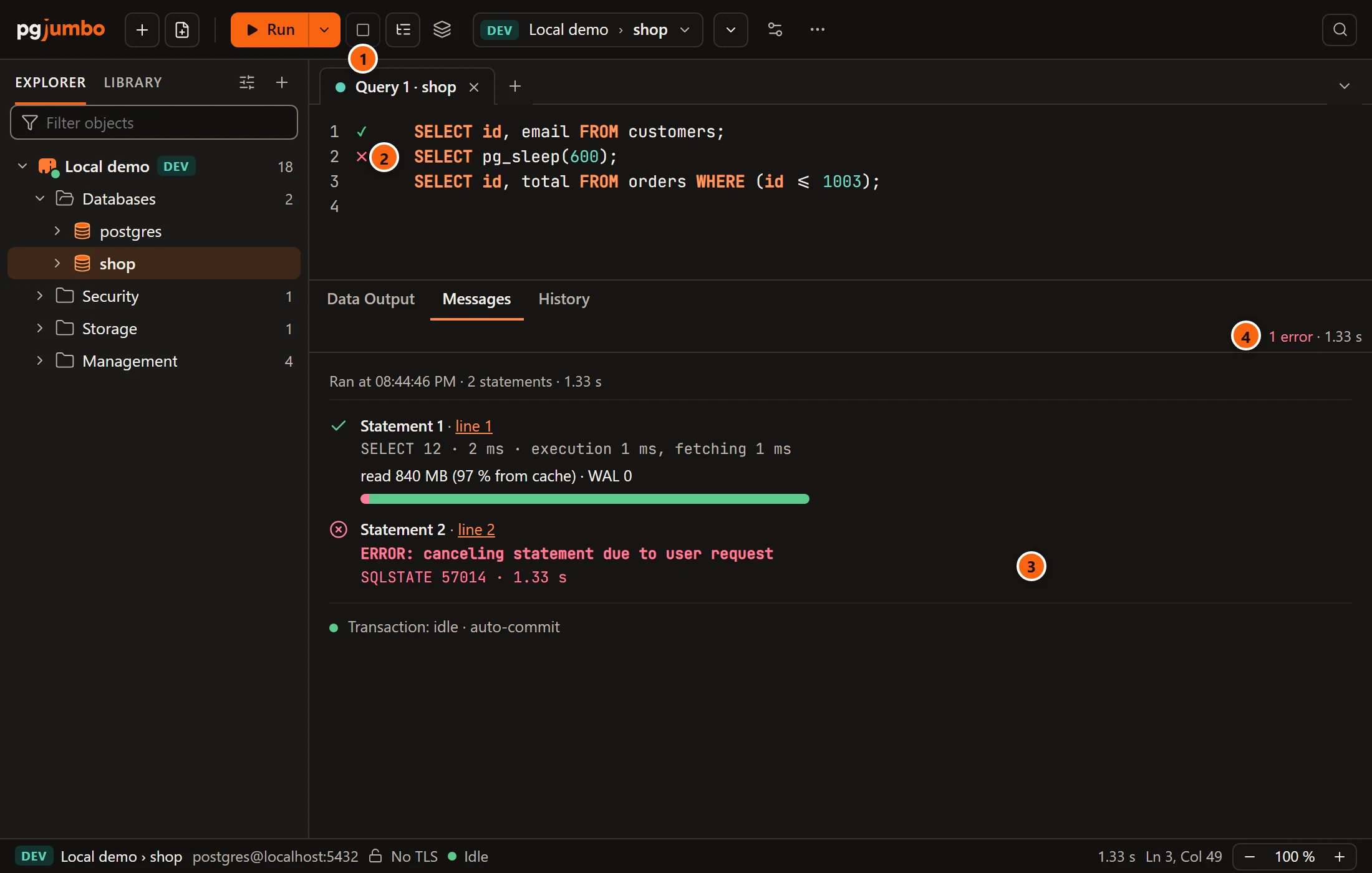
- 1 Stop. It is red while something runs and greyed again afterwards.
- 2 The statement that was running gets a cross. The statement after it has no mark: it never ran.
- 3 PostgreSQL’s answer to the cancel:
canceling statement due to user request(SQLSTATE57014). - 4 A stopped statement counts as an error.
pgjumbo sends PostgreSQL a cancel request for the tab’s session, the same request psql sends when you press Ctrl+C. Statements that finished before it stay as they ran, rows that had already arrived stay in the grid, and the rest of the script does not run, whichever choice When a statement fails has. Inside a transaction that is open, a stopped statement counts as a failed one; see The Transaction view.
Stop also stops an Explain, a watch’s run and a run on several databases (every database at once). Closing a tab that is running asks first; see Drafts, closing and quitting.
When Stop does not reach the server
Section titled “When Stop does not reach the server”The cancel request travels on a connection of its own. If it cannot get through (a tunnel that went down, say), the
tab says so instead of seeming to stop:
Stop did not reach the server:, the reason, then The query may still be running. Check the connection and try Stop again.
The query and its session stay as they were; pgjumbo does not drop the session or claim the query stopped. When the
connection itself is gone, the tab says its session was lost.
When pgjumbo’s own read waits
Section titled “When pgjumbo’s own read waits”pgjumbo reads a few things on the tab’s session itself: the Transaction menu’s settings when it opens, and what the
statement under the cursor will touch or cost. On a server that has stopped answering, such a read waits and holds
the tab’s connection. The menu stops waiting after a few seconds and draws without them. A Run meanwhile is not
sent, and Messages says what holds the connection and for how long, ending with Stop cancels it. Stop turns
red and cancels that read. pgjumbo never cuts the connection by itself, which would roll back an open transaction on
a server that is only slow.
Run This CTE
Section titled “Run This CTE”Run This CTE runs one common table expression of a WITH query on its own, so you can see what that step returns
without running the whole statement. Put the cursor inside the parentheses of one of the WITH’s queries, then
choose QueryRun This CTE, the same item in Run’s ⌄ menu, or Run This CTE on the
editor’s right-click menu.
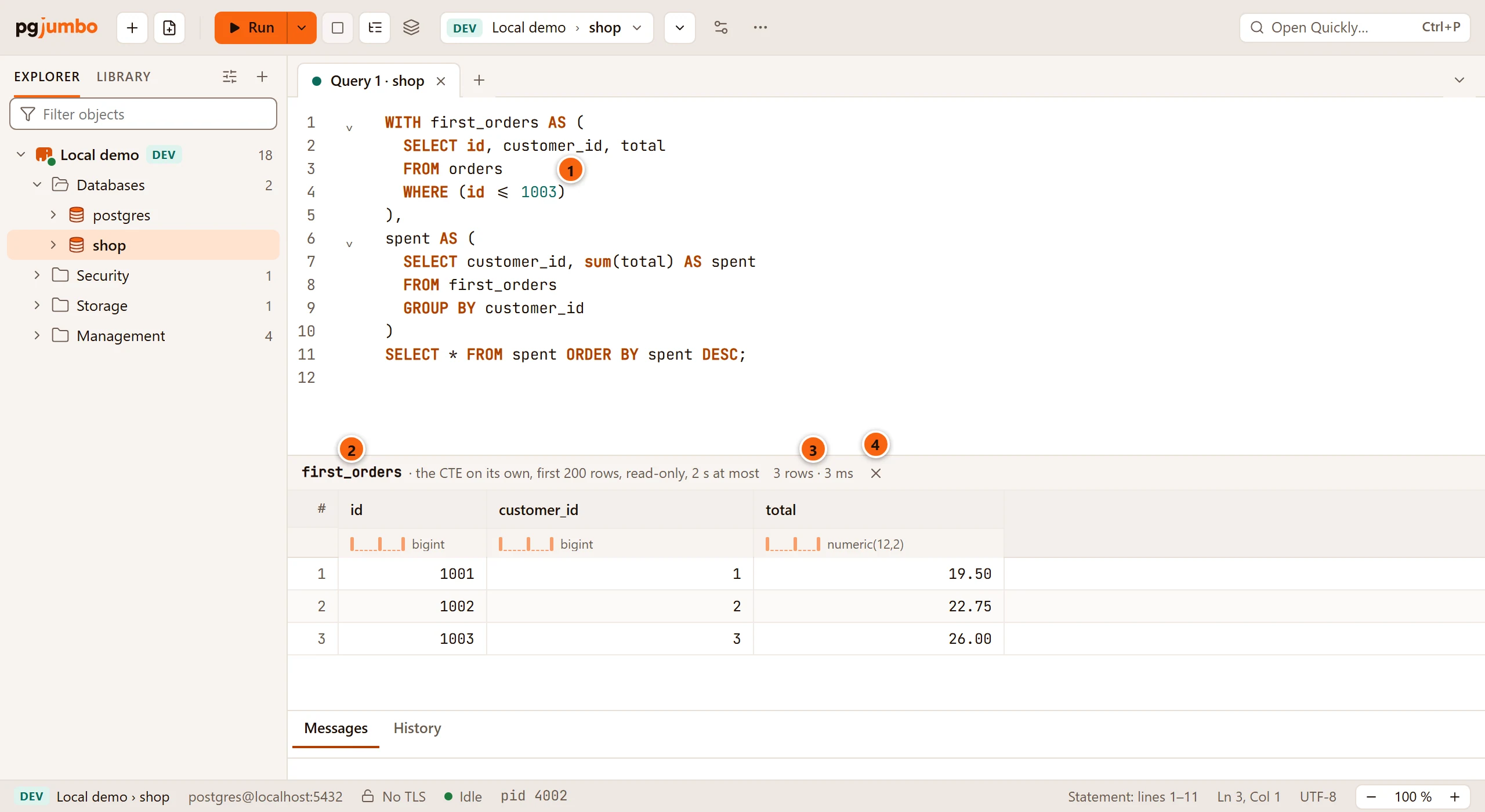
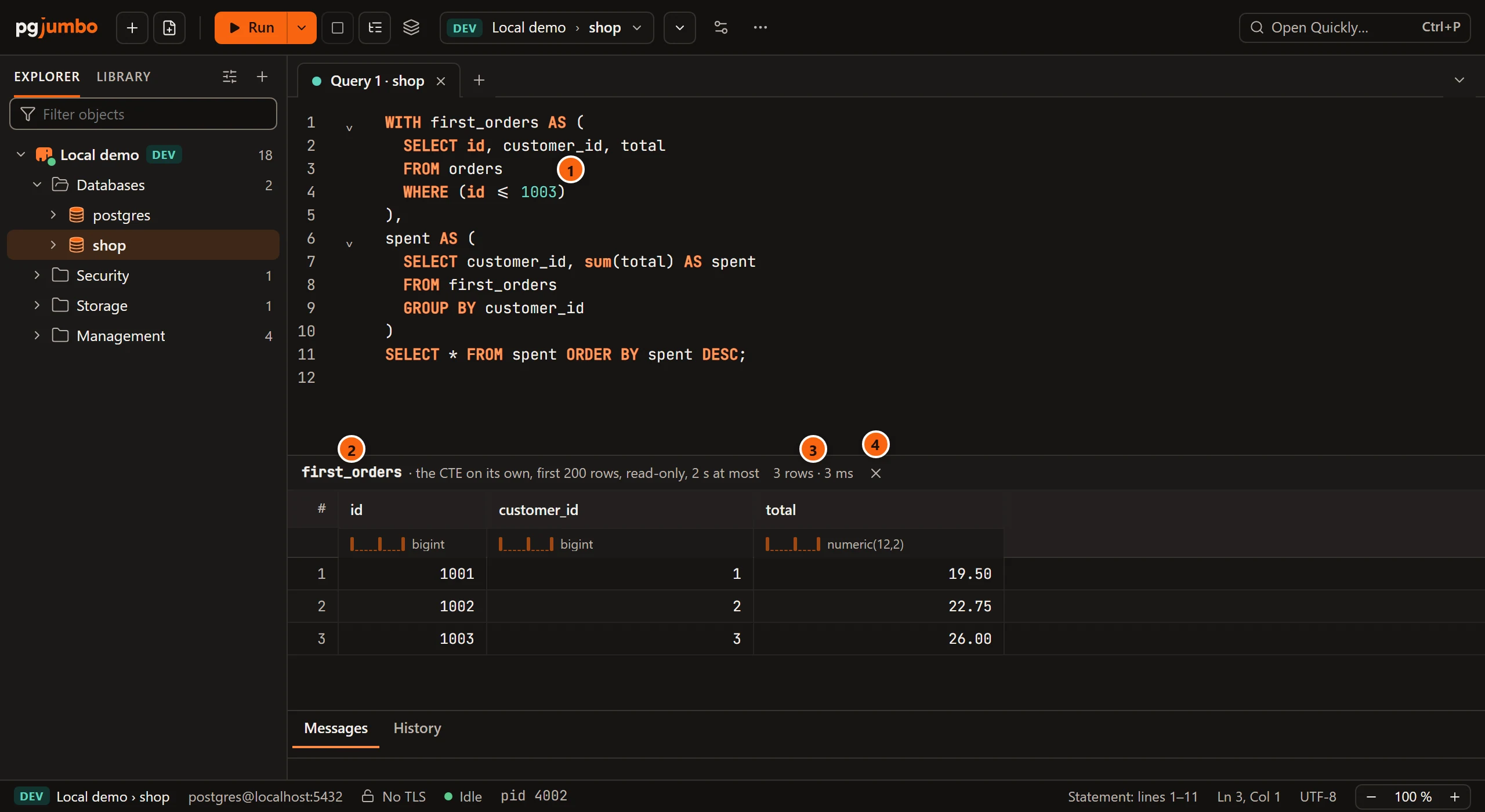
- 1 The cursor, inside the parentheses of
first_orders. - 2 A pane opens under the editor, headed by the CTE’s name and what was done:
the CTE on its own, first 200 rows, read-only, 2 s at most. When the CTE reads earlier ones, they run with it and the heading names them (the CTE on its own, with first_orders, …). - 3 Its rows and its time, or
Running…. When the CTE has more than 200 rows, this readsFirst 200 rows of more. - 4 Close puts the pane away. The tab’s next run does too.
What it does, exactly:
- It runs
WITH … SELECT * FROMthat CTE, taking along the earlier CTEs it needs, and nothing of the rest of the statement. - It runs in a read-only transaction of its own on the tab’s session, for 2 seconds at most, keeps the first 200 rows, and rolls the transaction back afterwards, whatever happened. It never writes.
- The tab’s own results stay where they are. You can select and copy cells in the pane’s grid.
- On a server that asks before risky statements (Production, or Staging when you set it so), it asks first: Run the CTE first_orders on Local demo?, with Run the CTE.
| The tab says | Why |
|---|---|
The cursor is in no CTE: put it inside the parentheses of one of a WITH's queries. |
The cursor is outside every CTE’s parentheses. |
Finish this tab's transaction first: a CTE runs on its own, in a read-only transaction. |
A transaction is open on the tab. Commit or roll back, then run the CTE again. |
An error from the server, or the 2-second limit, shows in the pane in the CTE’s place.
Run in New Tab
Section titled “Run in New Tab”Run in New Tab runs the selection, or else the statement at the cursor, in a new Query Tool tab on the same server and database. The new tab has a session of its own, so it runs even while the first tab is still busy with a long query. Choose QueryRun in New Tab or the same item in Run’s ⌄ menu.
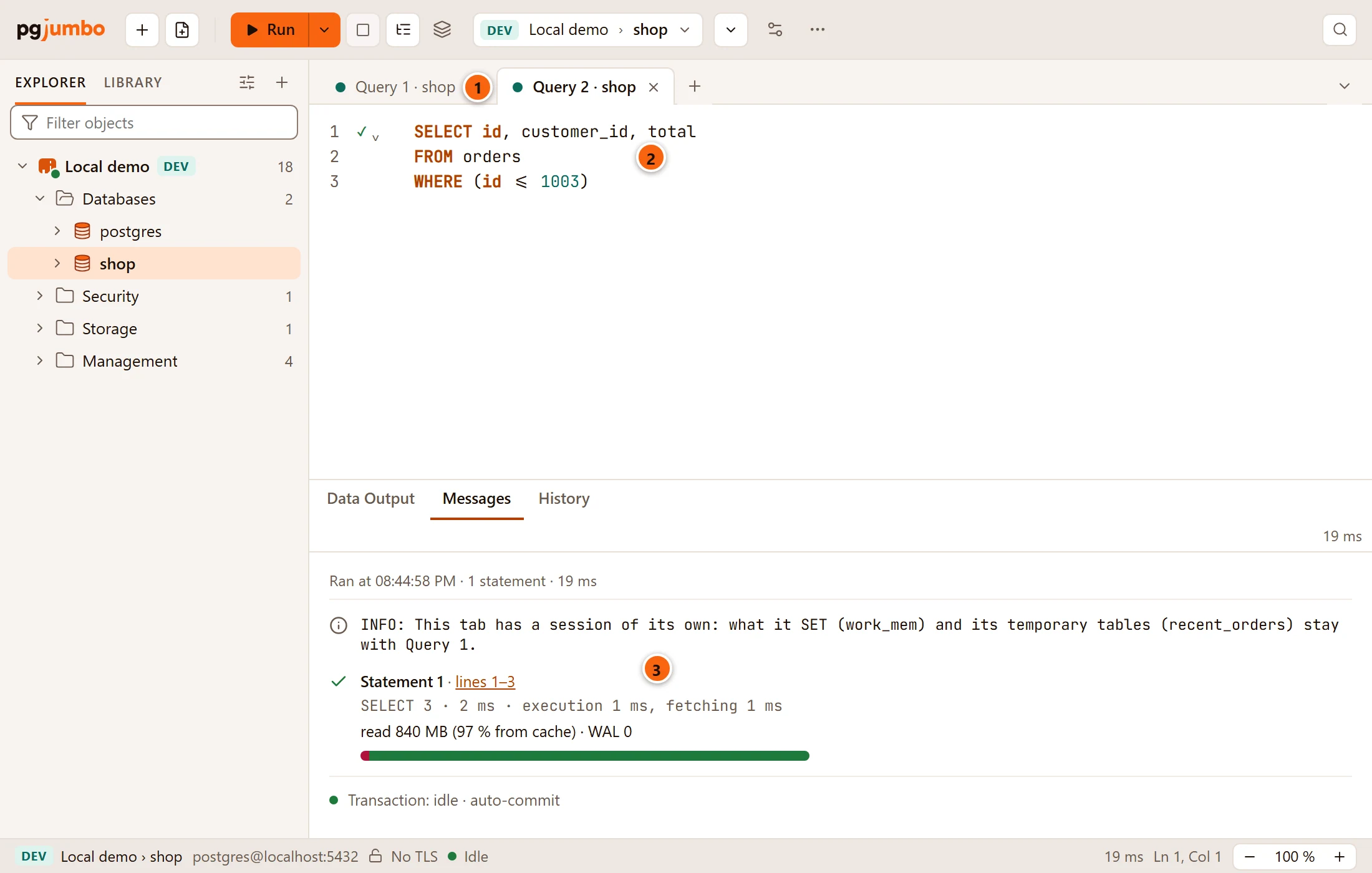
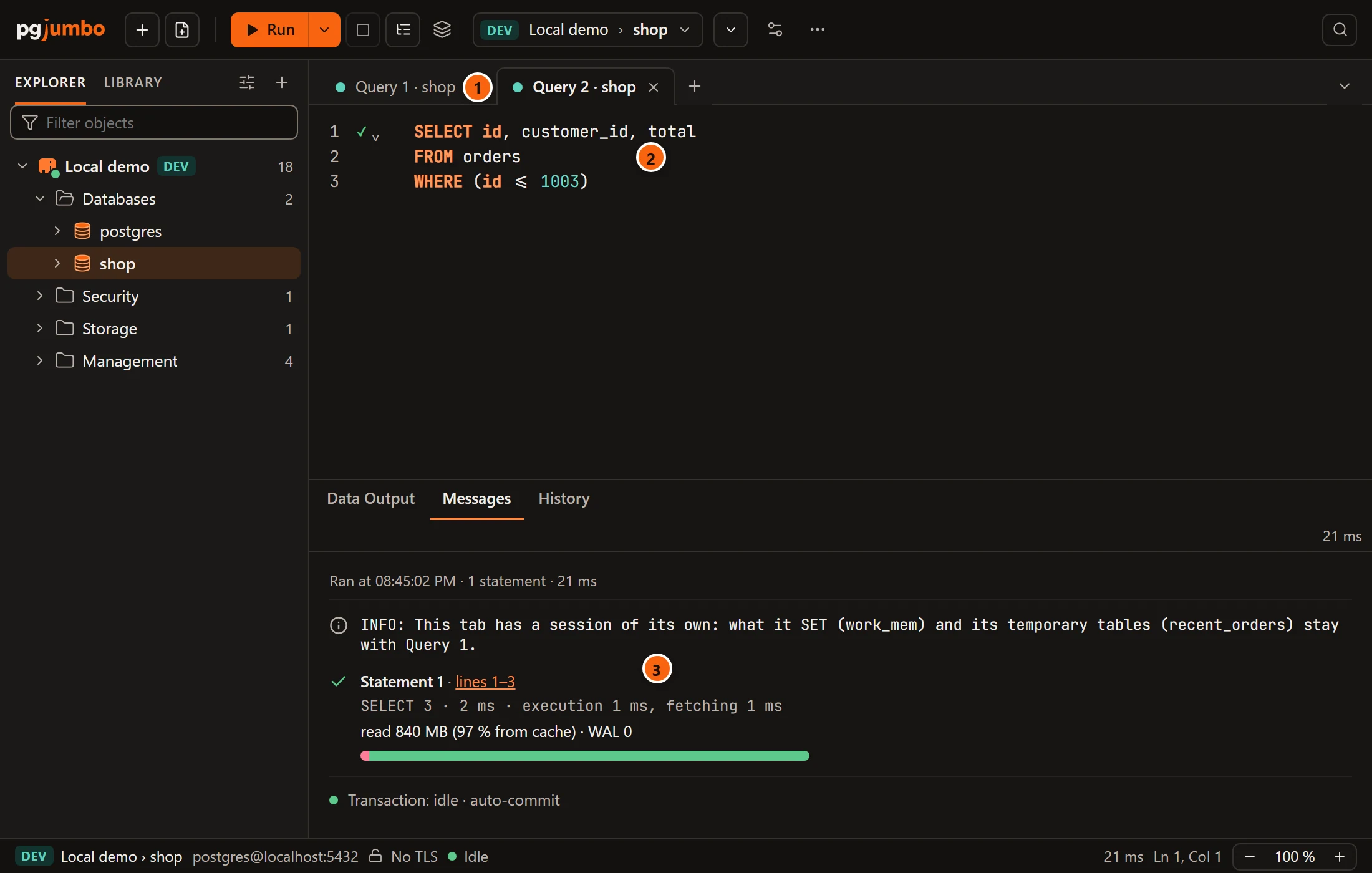
- 1 The new tab comes forward. The first tab stays as it was: its session, its transaction and its run go on.
- 2 It holds only the SQL that ran.
- 3 A session does not share what another one set up. When the first tab’s session has
SETsettings or temporary tables, the new tab’s Messages say so first and name them. Run what the statement depends on again in the new tab.
The new tab starts as any new tab does, with the commit mode from SettingsRunning queriesTransactionsNew Query Tool tabs and none of the first tab’s session settings. With the cursor on a blank line and nothing selected there is no statement to run, and nothing opens.
When a long query ends
Section titled “When a long query ends”When a run takes longer than you chose and pgjumbo is not the window in front as it ends, your system shows a
notification: Query finished or Query failed, with the tab’s name, how long the run took and, when it
succeeded and returned rows, how many (Query 1 · shop · 12.4 s · 1,204 rows). It never contains the SQL. A query you
stopped counts as failed. While pgjumbo is the window in front, nothing shows. A run on several databases notifies the
same way; Explain does not.
Choose when it shows in SettingsGeneralNotificationsTell me when a query finishes: Never, After 5 seconds, After 10 seconds (the default), After 30 seconds, After a minute or After 5 minutes. If no notification appears, check that your system allows notifications from pgjumbo.