
Types, domains and other schema objects
A schema’s Types folder holds its enum, composite, range and base types. A type opens in a tab of its own, where you can rename it, give it to another owner, add and rename an enum’s labels, or change a composite type’s attributes, within what PostgreSQL allows. Domains, collations, aggregates, operators and the four kinds of text search objects have folders of their own; pgjumbo shows them, scripts them and drops them, and you change them in a Query Tool.
The Types folder lists the types you can use in a column: enums, composite types, ranges and base types. It leaves
out the row type every table has, the array types PostgreSQL makes for each type and the multirange types it makes
for each range; domains have a folder of their own. Each row shows the type’s name and its kind (enum, composite,
range or base).
pgjumbo does not create types: write CREATE TYPE in a Query Tool.
Open a type
Section titled “Open a type”- Double-click a type in the Explorer, or select it and press Enter.
- Right-click it and choose Properties…, or select it and press ⌘ I (Alt+Enter on Windows and Linux).
- Find it with Open Quickly, or double-click it in Object Details.
The tab opens on General, or comes to the front if it is open. The server must be connected. The header shows the type’s name, what it is and when the tab read it, with Open in Query Tool (its CREATE script in a new Query Tool, not run) and Read again (which drops changes you have not saved).
| Kind | The header says | Its views |
|---|---|---|
| Enum | Enum · how many labels | General, Labels, Used by, Privileges, SQL |
| Composite type | Composite type · how many attributes | General, Attributes, Used by, Privileges, SQL |
| Range | Range · of its subtype | General, Used by, Privileges, SQL |
| Base type | Base type | General, Used by, Privileges, SQL |
When columns hold the type, the header also says how many (“used by 2 columns”).
The General view
Section titled “The General view”| Field | What it does |
|---|---|
| Name | Renames the type (ALTER TYPE … RENAME TO). |
| Schema | Moves it to another schema (ALTER TYPE … SET SCHEMA). |
| Owner | Gives it to another role (ALTER TYPE … OWNER TO). |
| Comment | Sets or clears its comment (COMMENT ON TYPE). |
| Subtype | A range’s subtype, locked. |
A base type is written in C, so for one a note says that only its name, owner, comment and privileges change here.
An enum’s labels
Section titled “An enum’s labels”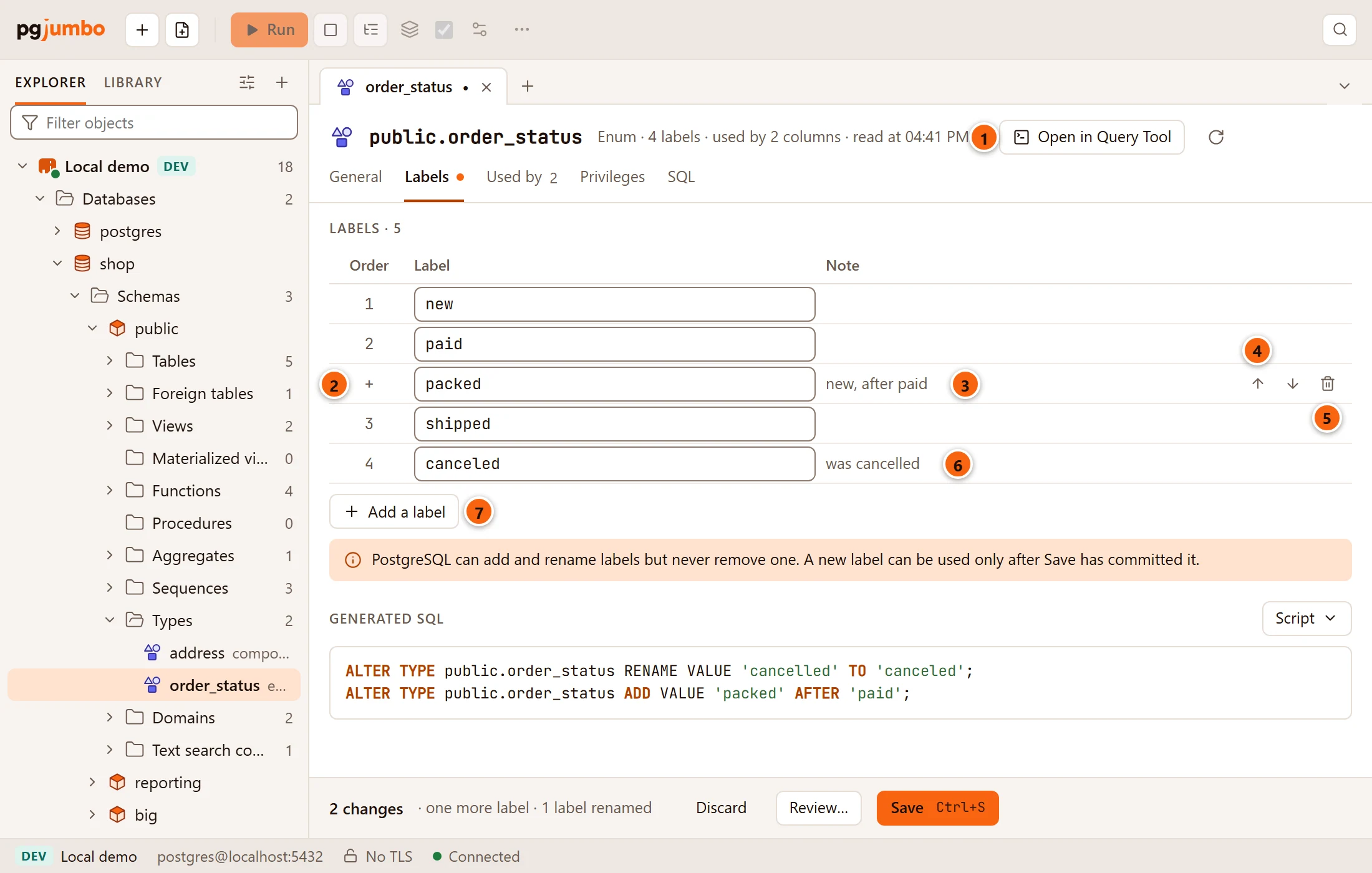
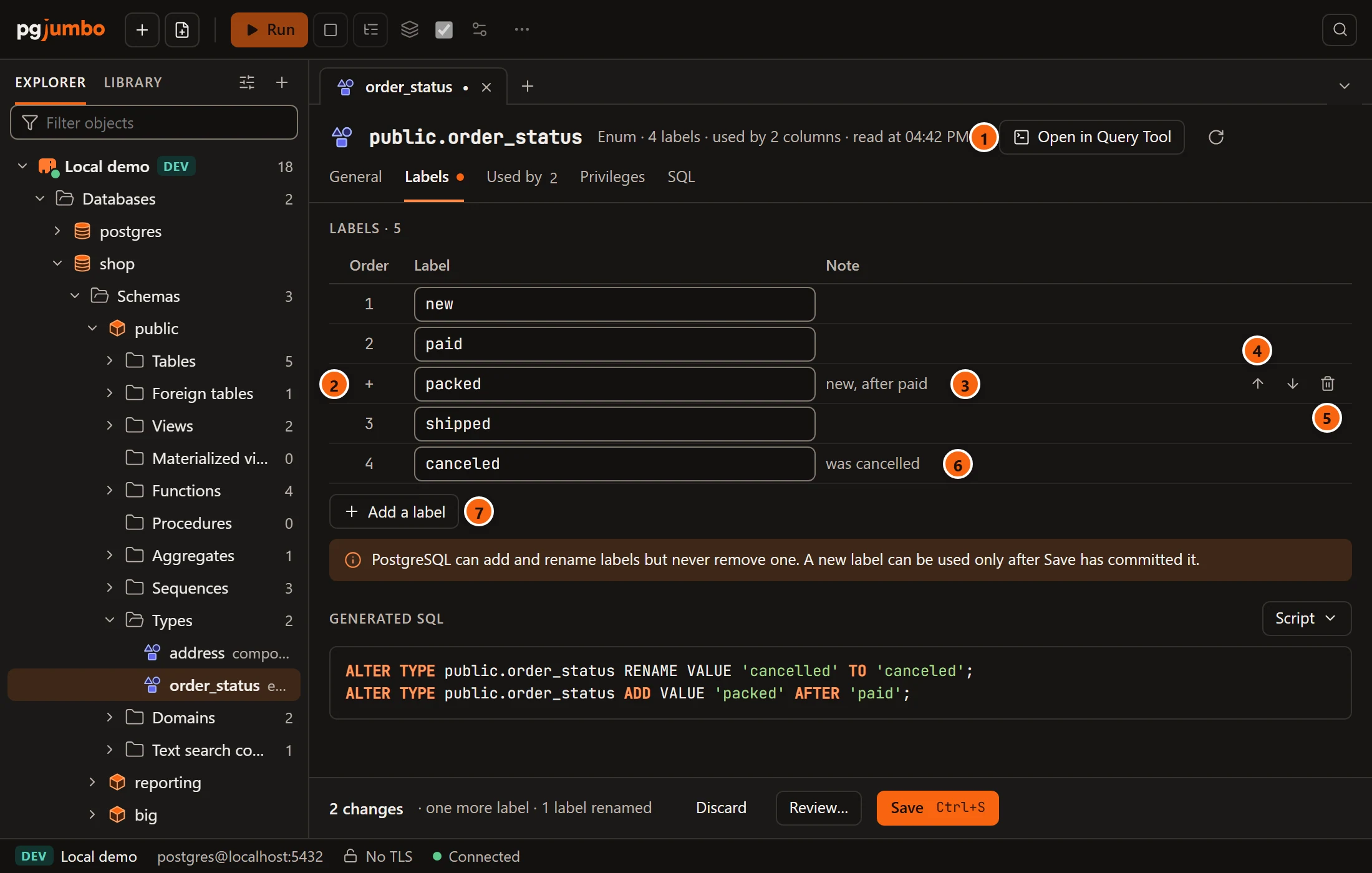
- 1 The header says how many labels the enum has and how many columns use it.
- 2 Order: the label’s place. A label you added shows + until it is saved.
- 3 Note says where a new label goes: “new, first” or “new, after paid”.
- 4 The up and down arrows move a new label among the others.
- 5 The bin removes a new label.
- 6 Edit a label’s text to rename it; the note says what it was called.
- 7 Add a label adds an empty row at the end.
PostgreSQL can add a label anywhere and rename one, but it never removes a label or moves one, so only the labels you add have arrows and a bin. The note under the table repeats that a label is never removed, and adds that a new label can be used only after Save has committed it. Each label must be there once, must not be empty and can be at most 63 bytes.
Generated SQL shows the statements: first ALTER TYPE … RENAME VALUE for each renamed label, then
ALTER TYPE … ADD VALUE for each new one, placed AFTER the label before it, or BEFORE the first existing label
when it goes first.
A composite type’s attributes
Section titled “A composite type’s attributes”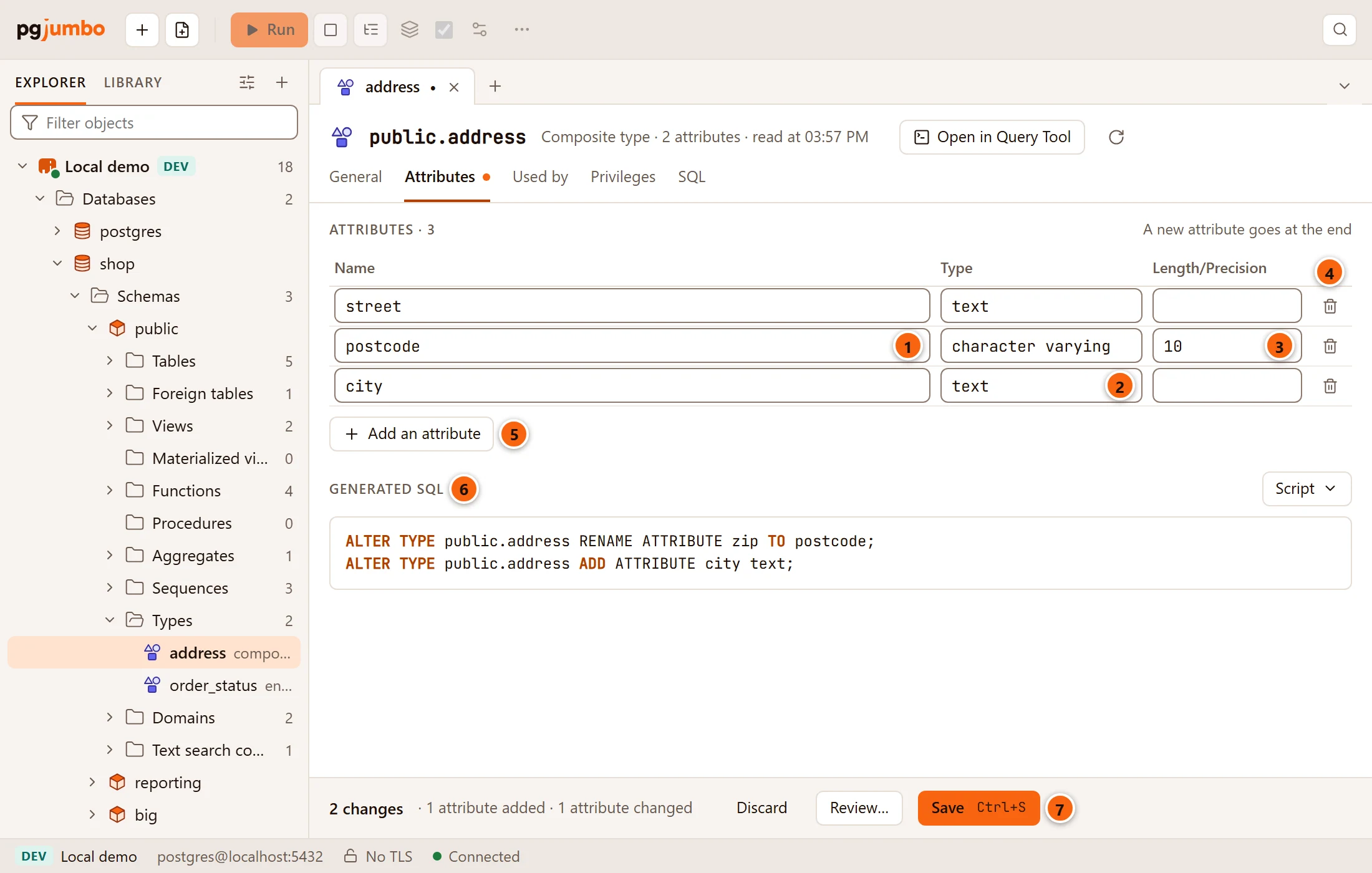
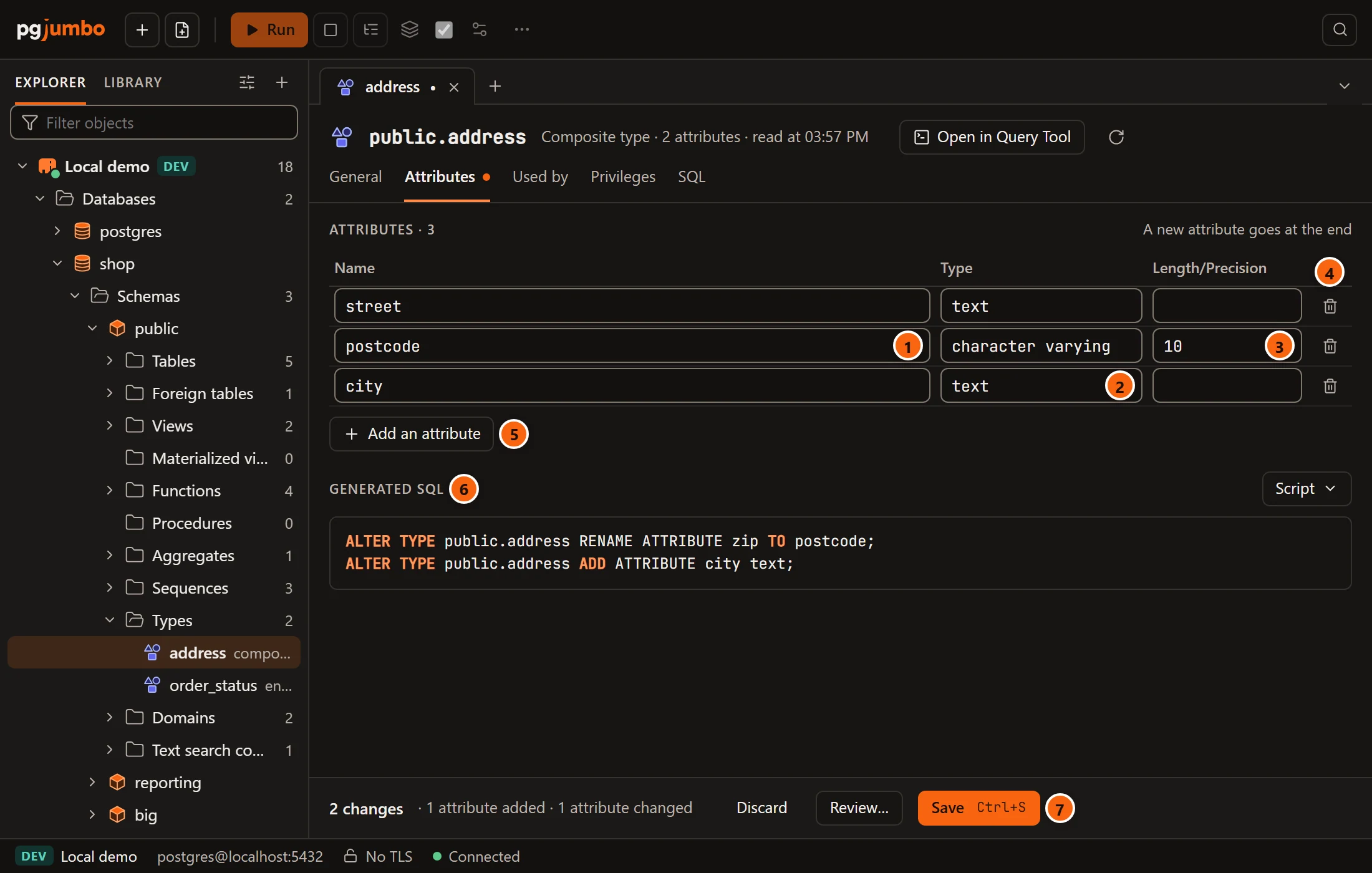
- 1 Edit an attribute’s Name to rename it.
- 2 Type: its type. As you type, pgjumbo suggests the types it knows. A type outside
pg_catalogand the type’s own schema needs its schema, as inpublic.status. - 3 Length/Precision: for types that take one, such as
10forcharacter varying(10)or12,2fornumeric(12,2). - 4 The bin drops an attribute (or removes a new one).
- 5 Add an attribute adds one at the end, of type
text. A new attribute always goes at the end. - 6 Generated SQL:
DROP ATTRIBUTE, thenRENAME ATTRIBUTE, thenALTER ATTRIBUTE … TYPE, thenADD ATTRIBUTE. - 7 Save (⌘ S (Ctrl+S on Windows and Linux)).
Two things stop changes here:
- While a column holds the type (or an array of it), an attribute’s type cannot change. The Type and Length/Precision fields of the existing attributes are locked, and a note names the columns: you can still add, rename and drop attributes.
- When typed tables are made of the type (
CREATE TABLE … OF), its attributes change only withCASCADE, which changes those tables too. Everything on this view is locked, and a warning names the tables and sends you to a Query Tool.
Two attributes cannot share a name, and a type pgjumbo cannot find is refused in red under Generated SQL.
Used by, Privileges and SQL
Section titled “Used by, Privileges and SQL”- Used by lists what the type depends on and what uses it; its tab label counts the columns that hold the type. Open shows an object in the Inspector.
- Privileges shows who holds
USAGEon the type, granted and revoked as in Privileges. - SQL shows its CREATE script, with Open in Query Tool and the Script menu.
Save your changes
Section titled “Save your changes”The pending bar counts what you changed (“2 changes · one more label · 1 label renamed”) and offers Discard, Review… and Save (⌘ S (Ctrl+S on Windows and Linux)). A type’s changes only change the catalog and lock no table, so Save runs them at once, in one transaction on a connection of its own. On a server that asks first (Production, or Staging when Settings say so) the review sheet opens and you type the database’s name; see Object tabs and review. If the type changed since the tab read it, nothing runs and the pending bar offers Read again.
The right-click menu of a type
Section titled “The right-click menu of a type”A type’s menu has Query Tool, Script as ▸ (CREATE and DROP and CREATE, opened in a new Query Tool), Properties… (the tab on General), Copy name and Drop…. There is no Create on the Types folder: pgjumbo does not create types. See Scripts and Drop, truncate and other quick actions.
Domains, collations, aggregates, operators and text search
Section titled “Domains, collations, aggregates, operators and text search”A schema shows a folder for each of these kinds only when it has some, so most schemas show none of them. The folders
come in this order among the others: Aggregates after Procedures; Domains, Collations, Operators,
Text search configurations, Text search dictionaries, Text search parsers and Text search templates
after Types. PostgreSQL’s built-in collations, operators and text search objects live in pg_catalog, which the
Explorer shows when system objects are on (see The Explorer).
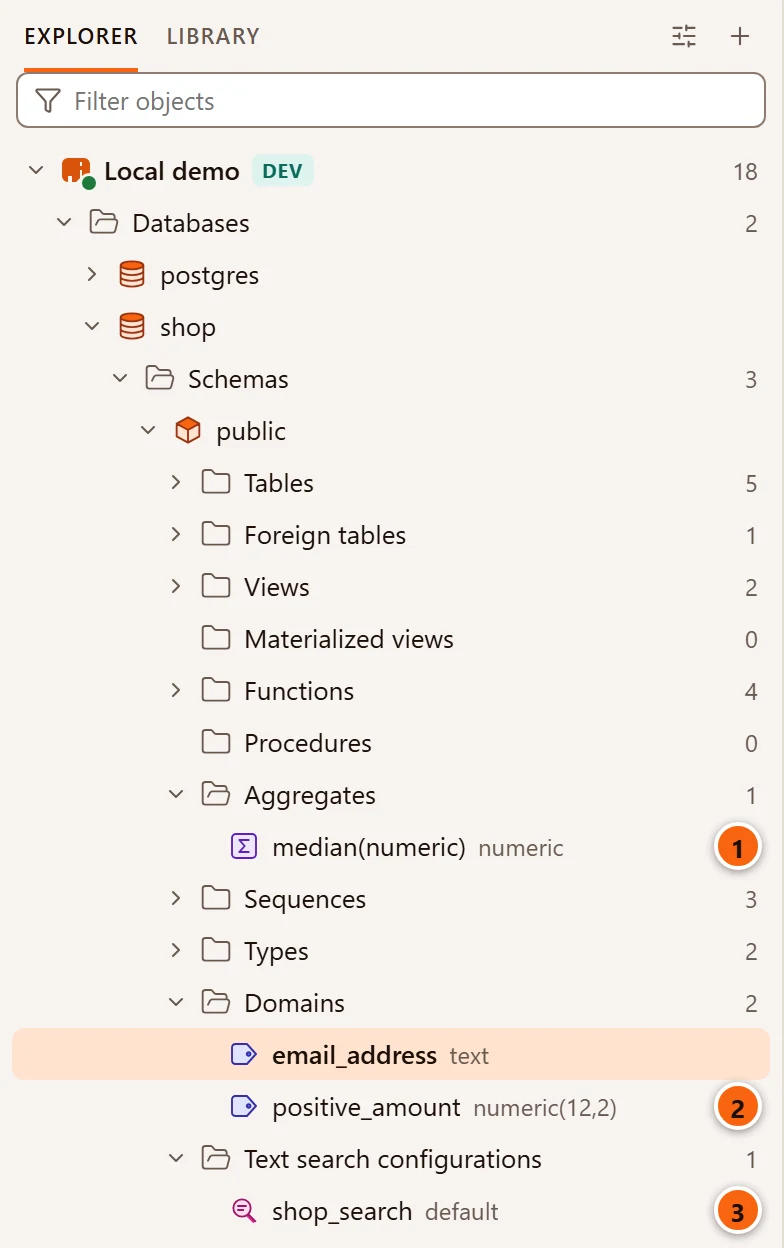
- 1 An aggregate, by name and argument types, with the type it returns.
- 2 A domain, with the type it is based on.
- 3 A text search configuration, with its parser.
| Folder | Each row shows | Notes |
|---|---|---|
| Domains | the type it is based on | |
| Collations | its provider: icu, libc, builtin or default |
Only collations that work in the database’s encoding. |
| Aggregates | name and argument types (* when it takes none), and what it returns |
Aggregates are not in Functions. |
| Operators | name (left, right), with NONE on the left of a prefix operator, and what it returns |
An operator that is only named, as another’s commutator or negator, is left out. |
| Text search configurations | its parser | |
| Text search dictionaries | its template | |
| Text search parsers | its name | No owner. |
| Text search templates | its name | No owner. |
These objects have no tab. Click one to see it in the Inspector: Summary with its properties, SQL with its CREATE script, and Dependencies. A double-click does nothing.
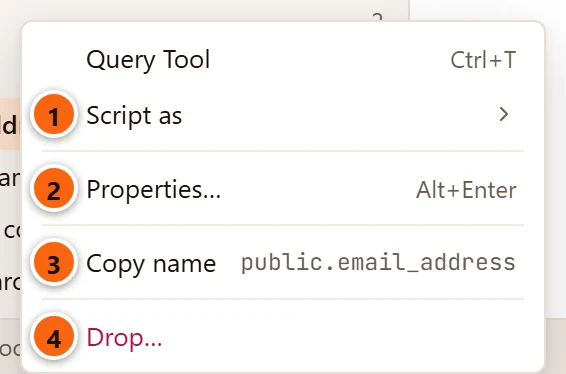
- 1 Script as ▸ CREATE or DROP and CREATE, opened in a new Query Tool. Use it to change the object: edit the script there and run it.
- 2 Properties… (⌘ I (Alt+Enter on Windows and Linux)) shows the Inspector on Summary.
- 3 Copy name copies its schema-qualified name.
- 4 Drop… drops it. See Drop, truncate and other quick actions.
Query Tool at the top opens a new Query Tool on the object’s database.
What the Inspector shows
Section titled “What the Inspector shows”| Kind | Summary | CREATE script |
|---|---|---|
| Domain | Owner, Based on, Default, Not null, Collation (when it is not the base type’s), Checks | CREATE DOMAIN with its collation, default, NOT NULL and checks. A check added NOT VALID is added afterwards the same way. Then its owner, comments and grants. |
| Collation | Owner, Provider, Locale, or LC_COLLATE and LC_CTYPE for libc, ICU rules (PostgreSQL 16 and later), Deterministic, Version | CREATE COLLATION with its provider, locale, rules and DETERMINISTIC = false when it is not, then its owner. The database’s default collation is not created; the script says so. |
| Aggregate | Owner, Arguments, Returns, Kind (normal, ordered-set or hypothetical-set), State function, State type, Final function, Combine function, Initial state, Parallel | CREATE AGGREGATE with every support function named with its schema, then its owner, comment and grants. |
| Operator | Owner, Left argument (none for a prefix operator), Right argument, Returns, Function, Commutator, Negator, Restriction estimator, Join estimator, Hash joins, Merge joins | CREATE OPERATOR with each of those, then its owner and comment. |
| Text search configuration | Owner, Parser, Mappings (each list of dictionaries with the token types that use it) | CREATE TEXT SEARCH CONFIGURATION, then one ADD MAPPING for each list of dictionaries, then its owner. |
| Text search dictionary | Owner, Template, Options | CREATE TEXT SEARCH DICTIONARY with its template and options, then its owner. |
| Text search parser | Start, Get token, End, Token types, Headline | CREATE TEXT SEARCH PARSER with its functions (HEADLINE only when it has one). |
| Text search template | Init, Lexize | CREATE TEXT SEARCH TEMPLATE with its functions (INIT only when it has one). |
Every kind also shows its OID, its comment above the properties, and, in the script, COMMENT ON when it has one.
Elsewhere in pgjumbo
Section titled “Elsewhere in pgjumbo”- Object Details lists a folder of any of these kinds.
- Filter… on their folders narrows them by name, and by owner except for text search parsers and templates, which have no owner. See The Explorer.
- TasksGenerate Scripts… on a database or a schema includes them. See Scripts.