
Amazon RDS and Aurora
Amazon RDS for PostgreSQL and Aurora PostgreSQL are PostgreSQL servers, so a user with a password connects to them like to any other (Connection settings). This page covers what pgjumbo does on top of that: sign-in with AWS IAM instead of a saved password, AWS’s certificate bundle, an Aurora cluster’s reader endpoint, and the views that change because Amazon keeps the server’s settings in a parameter group.
Sign in with AWS IAM
Section titled “Sign in with AWS IAM”With IAM database authentication there is no database password to keep. For every connection, pgjumbo signs a token with your AWS credentials and gives it to PostgreSQL as the password.
On the AWS side, three things must be in place first:
- IAM database authentication is turned on for the DB instance or the Aurora cluster.
- The database user exists and is a member of
rds_iam, for exampleCREATE ROLE app_iam LOGIN; GRANT rds_iam TO app_iam;run as the master user. - Your AWS identity has an IAM policy that allows
rds-db:connecton that user (arn:aws:rds-db:<region>:<account>:dbuser:<resource id>/app_iam).
Then open the connection dialog (Connect in the main toolbar, New connection in the Explorer’s header, or Edit connection… on a server’s right-click menu) and fill in the server.
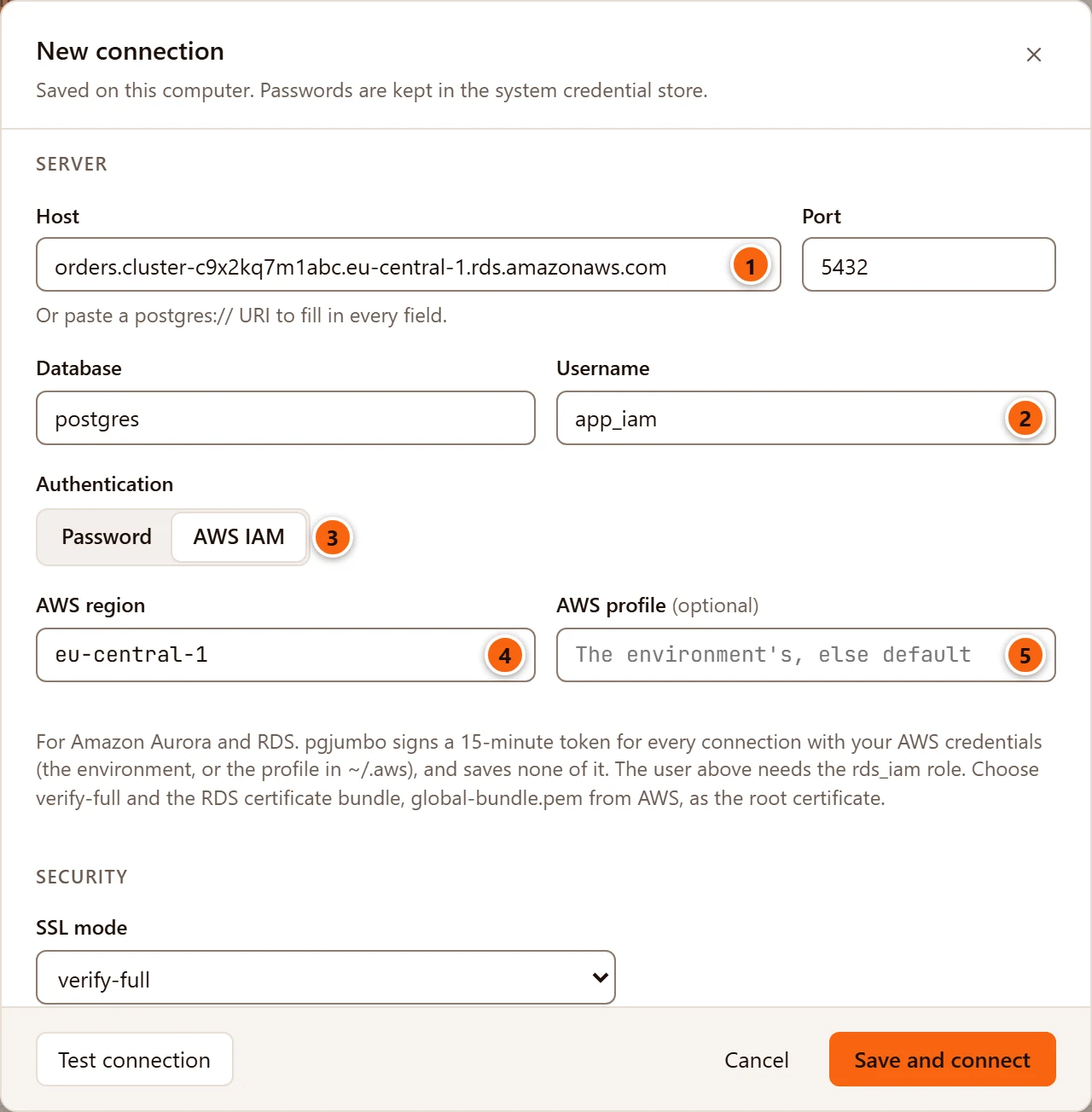
- 1 Host is the instance’s endpoint, or for Aurora the cluster’s endpoint, as AWS names it, for example
orders.cluster-c9x2kq7m1abc.eu-central-1.rds.amazonaws.com. The token is signed for this name and the Port next to it, so use the endpoint itself, not an IP address or a DNS alias of your own. - 2 Username is the database user that is a member of
rds_iam. It cannot be empty with IAM sign-in. - 3 Authentication switches between Password and AWS IAM. Choosing AWS IAM hides the
Password field and its Save password box, opens Certificates and session, and changes SSL mode to
verify-fullwhen it wasdisable,alloworprefer. Saving the server then deletes a password saved for it. Choosing Password again empties the region and profile; SSL mode stays as it is. - 4 AWS region is the region the database is in, for example
eu-central-1. Leave it empty (the placeholder says The profile’s) to use theregionof the AWS profile, else theAWS_REGIONenvironment variable. - 5 AWS profile (optional) names a profile in your
~/.awsfiles. Leave it empty (the placeholder says The environment’s, else default) to use the keys in your environment, else theAWS_PROFILEprofile, elsedefault.
The note under the fields says the same in short: pgjumbo signs a 15-minute token for every connection with your AWS
credentials, saves none of it, the user needs the rds_iam role, and you should choose verify-full with AWS’s
certificate bundle.
What happens to the token:
- pgjumbo signs it on your computer, without calling AWS, and never saves or logs it. A server with IAM sign-in has no saved password: Save password is turned off for it.
- Every new connection gets a fresh token: the Explorer’s (also when it reconnects on its own), each Query Tool and data tab, the server tab’s Activity view, the connection a Drop… or a Truncate… runs on, and the programs of a backup, restore or database copy, which get the token in their private password file (Back up and restore).
- A token is good for 15 minutes, and only for opening a connection. A connection that is already open stays open after that.
Test connection signs a token and opens one connection with it; its result line names the TLS version, for example
Connected · PostgreSQL 16.4 · TLSv1.3 · 92 ms. When the test fails and the Assistant is on, Explain next to the
message also checks, without signing in, whether pgjumbo finds a region and AWS credentials and how long temporary
ones are still good. It never shows or sends the keys (Connection settings).
Where pgjumbo finds your AWS credentials
Section titled “Where pgjumbo finds your AWS credentials”pgjumbo looks where the AWS command-line tools look, in this order:
- When AWS profile is empty and both
AWS_ACCESS_KEY_IDandAWS_SECRET_ACCESS_KEYare set in pgjumbo’s environment, it uses them, withAWS_SESSION_TOKENwhen that is set too. - Otherwise it uses a profile: the one in AWS profile, else the one
AWS_PROFILEnames, elsedefault. In that profile it takes:aws_access_key_idandaws_secret_access_key(andaws_session_token), from~/.aws/credentials(section[name]) or~/.aws/config(section[profile name]or[name]);- else the profile’s
credential_process, a command that prints temporary keys.
AWS_SHARED_CREDENTIALS_FILE and AWS_CONFIG_FILE point pgjumbo at other files, as they do for the AWS tools. The
region comes from the same profile’s region in ~/.aws/config when AWS region is empty; AWS_DEFAULT_REGION is
not read.
pgjumbo reads the credentials once when it connects a server and keeps them in memory, never on disk. Temporary
credentials that say when they expire (as a credential_process usually does) are read again when they are a minute
from running out; long-term keys are used until you disconnect. After changing your ~/.aws files, disconnect and
connect the server.
IAM Identity Center (SSO) and assumed roles
Section titled “IAM Identity Center (SSO) and assumed roles”pgjumbo does not sign in to IAM Identity Center or assume a role itself. A profile with sso_session, sso_start_url
or role_arn but no keys and no credential_process is refused with advice to add a credential_process. The AWS CLI
(version 2) can be that process:
[sso-session corp]sso_start_url = https://corp.awsapps.com/startsso_region = eu-central-1
[profile work]sso_session = corpsso_account_id = 123456789012sso_role_name = DatabaseAccessregion = eu-central-1credential_process = aws configure export-credentials --profile work --format process
Sign in with aws sso login --profile work before you connect, and type work in AWS profile. When the SSO
sign-in has expired, connecting fails with The credential_process failed: and the first line the CLI printed.
pgjumbo runs a credential_process through sh -c on macOS and Linux and through cmd /C on Windows (with no
window), as the AWS CLI does, and reads the JSON it prints: AccessKeyId and SecretAccessKey, with SessionToken
and Expiration when it gives them. Credentials from EC2 or ECS instance metadata and from web identity tokens are not
read.
When IAM sign-in fails
Section titled “When IAM sign-in fails”| Message | What it means |
|---|---|
| Give the AWS region of the database, or set one in the AWS profile. | AWS region is empty and neither the profile nor AWS_REGION gives one. |
| No AWS credentials: set AWS_ACCESS_KEY_ID and AWS_SECRET_ACCESS_KEY, or give the profile … keys or a credential_process in ~/.aws/credentials or ~/.aws/config. | The profile is missing or has no keys. Check the name in AWS profile. |
| The AWS profile … assumes a role or uses IAM Identity Center directly, which pgjumbo does not do itself. Give the profile a credential_process, … | Add a credential_process, as above. |
| The credential_process could not start: … / The credential_process failed: … / The credential_process printed no credentials: … | Run the command in a terminal to see what it does. |
| AWS IAM sign-in needs TLS: choose require, verify-ca or verify-full (with the RDS certificate bundle as the root certificate). | SSL mode is disable or allow. |
| Give the database user that signs in with AWS IAM. | Username is empty. |
| Use either a pg_service.conf service or AWS IAM sign-in, not both. | Empty Service under Certificates and session. |
A message ending in PAM authentication failed for user "app_iam" |
RDS turned the token down: the user is not in rds_iam, your IAM policy does not allow rds-db:connect for that user, IAM authentication is off, or the region or host is not the database’s. |
The TLS, user and service messages come when you test or save, before anything connects. Connecting from the Explorer
shows the others on the failed server: hover the warning icon in front of its name. There they start with their kind,
such as authentication failed: or invalid input:.
Check the server with the RDS certificate bundle
Section titled “Check the server with the RDS certificate bundle”RDS and Aurora present certificates signed by Amazon’s own certificate authorities. To check them, give pgjumbo AWS’s
certificate bundle and use verify-full. This applies to password sign-in too.
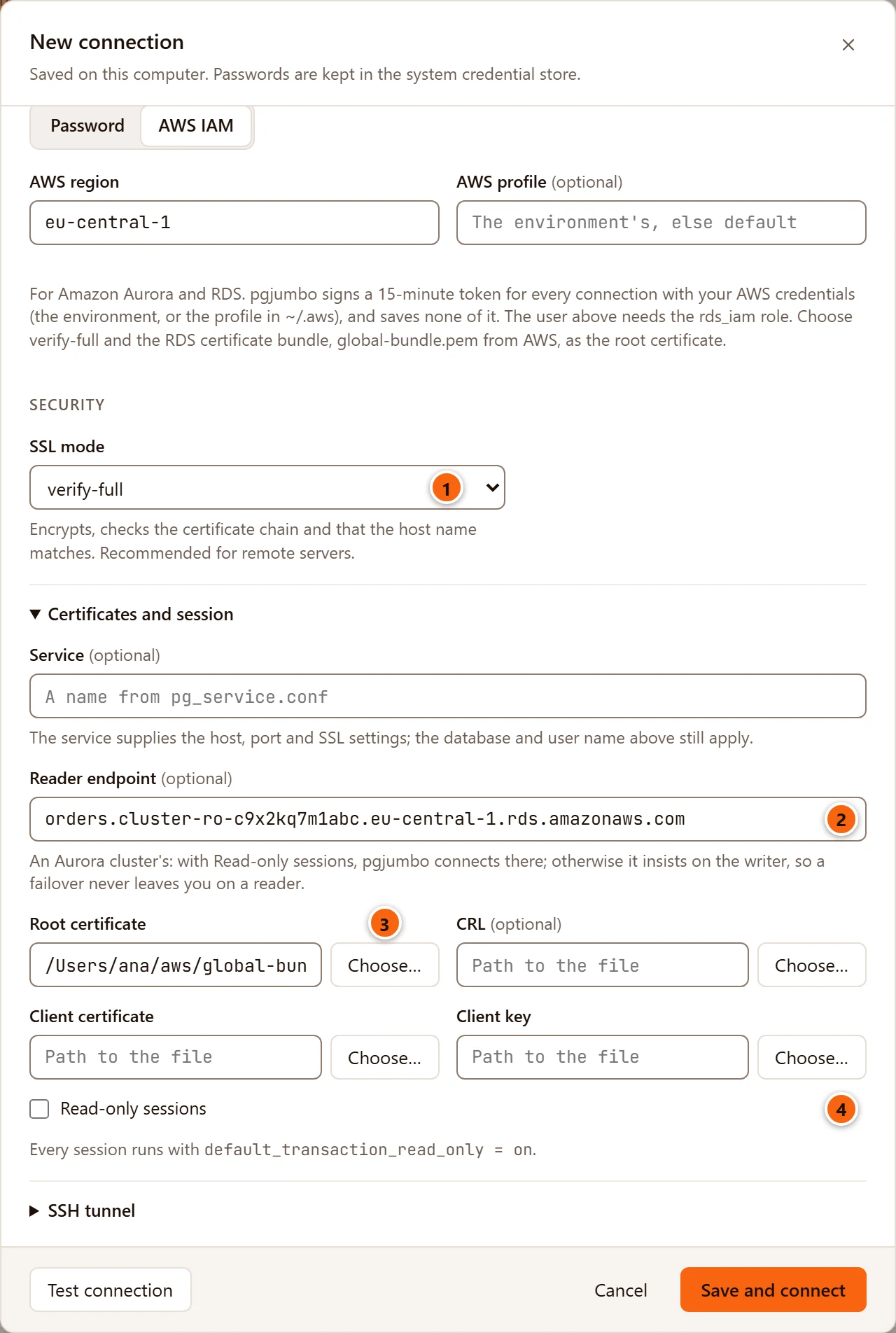
- 1 SSL mode
verify-fullencrypts the connection and checks both the certificate chain and that the certificate belongs to the endpoint in Host.verify-cachecks the chain only;requireencrypts without checking. With IAM sign-in, pgjumbo refusesdisableandallow, because RDS accepts an IAM token only over TLS. - 2 Reader endpoint (optional) is an Aurora cluster’s read-only endpoint; see the next section. Its hint says An Aurora cluster’s: with Read-only sessions, pgjumbo connects there; otherwise it insists on the writer, so a failover never leaves you on a reader.
- 3 Root certificate: click Choose… and pick
global-bundle.pem, which AWS publishes athttps://truststore.pki.rds.amazonaws.com/global/global-bundle.pem(one file for every region). The Open dialog is titled Choose the Root Certificate and shows.crt,.pemand.cerfiles first. You can also type the path. It is kept with the server; the file is read each time pgjumbo connects. - 4 Read-only sessions opens every session read-only, and with a reader endpoint sends the server’s connections to the readers.
The other fields here (Service, CRL, Client certificate, Client key) are explained in Connection settings. A reader endpoint cannot be combined with a Service: with Service filled in, Reader endpoint is greyed out, and a server saved with both is refused with Use either a pg_service.conf service or a reader endpoint, not both.
Use an Aurora cluster’s writer and reader endpoints
Section titled “Use an Aurora cluster’s writer and reader endpoints”An Aurora cluster has a writer endpoint (….cluster-….rds.amazonaws.com) that follows the writer instance, and a
reader endpoint (….cluster-ro-….rds.amazonaws.com) that spreads connections over the readers. Put the writer
endpoint in Host and the reader endpoint in Reader endpoint. Each connection then goes to one of them:
| Read-only sessions | Reader endpoint | Where connections go |
|---|---|---|
| Off | Empty | Host, as for any server. |
| Off | Filled in | Host, and only to a writer: pgjumbo asks libpq for a read-write session (target_session_attrs=read-write), so a connection that lands on a reader (DNS still pointing at the old writer right after a failover) is refused with a clear error instead of giving you a session that cannot write. |
| On | Empty | Host, with read-only sessions. |
| On | Filled in | The reader endpoint, with read-only sessions. IAM tokens are signed for the reader endpoint. |
The same choice applies to an SSH tunnel’s target and to the programs a backup or restore runs. Tagging a server Production ticks Read-only sessions by default, so a Production server with a reader endpoint goes to the readers until you untick it.
A failover drops open sessions. Query Tool and data tabs say they lost their connection and are never reconnected for you (Transactions and sessions); the Explorer’s own connections reconnect by themselves, each with a fresh token.
What changes on a server Amazon runs
Section titled “What changes on a server Amazon runs”Each time pgjumbo connects a server, it checks whether Amazon runs it: Aurora when the function aurora_version()
exists, RDS when a role named rds_superuser does. This does not depend on IAM: a server you sign in to with a
password is recognised too. HelpCopy Diagnostics… then shows Aurora or RDS after the server’s
version (Troubleshooting).
RDS and Aurora keep their settings in a DB parameter group (for Aurora, a DB cluster parameter group as well), and
refuse ALTER SYSTEM and pg_reload_conf(). The server tab’s Configuration view follows that.
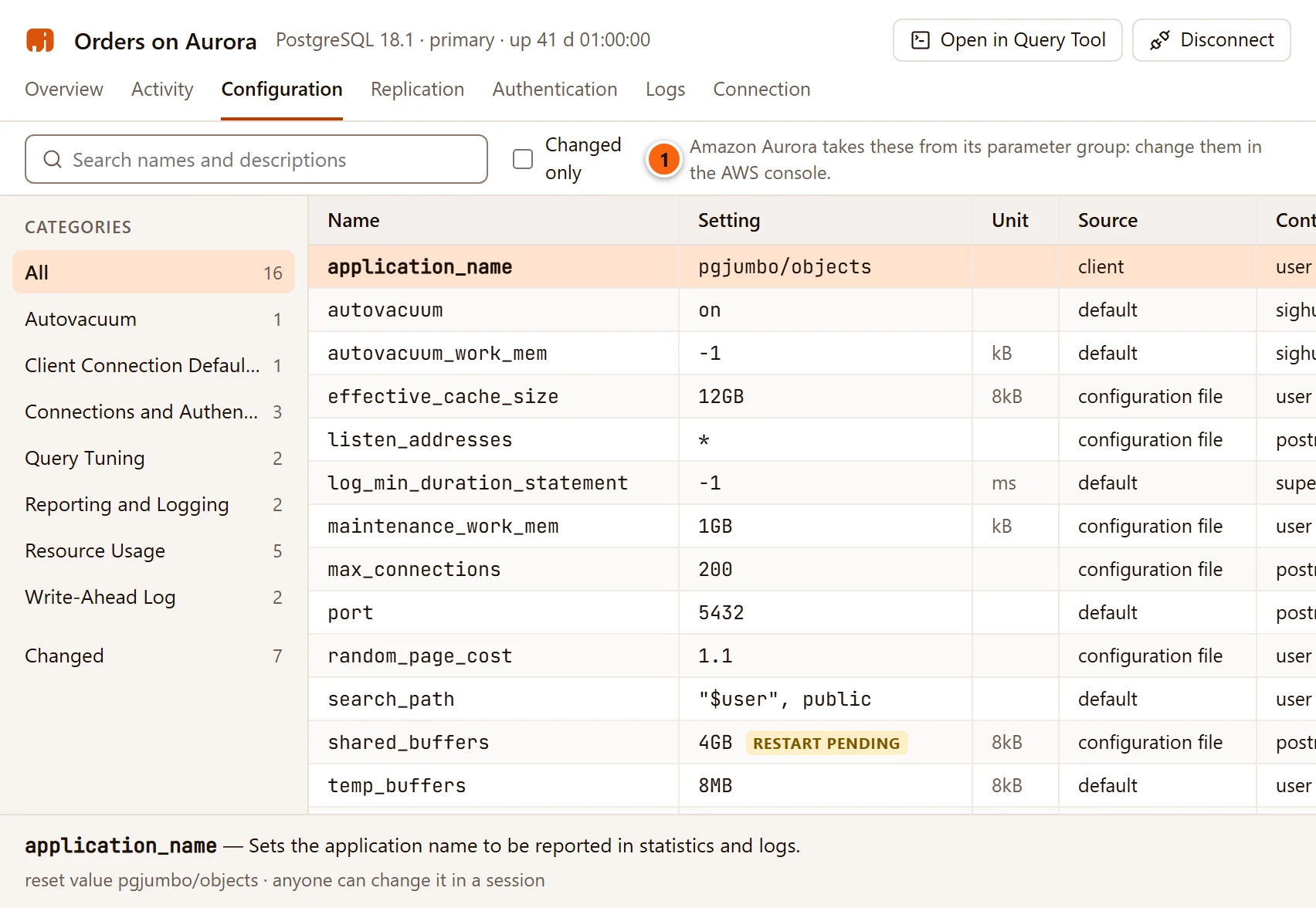
- 1 In place of Reload configuration, the view says Amazon Aurora takes these from its parameter group: change them in the AWS console. (or Amazon RDS …). You can still search the settings and read each one, but not change a value there. Change it in the parameter group, in the RDS console or with the AWS CLI.
The other places that adapt:
| Where | On RDS or Aurora |
|---|---|
| Configuration view | No Reload configuration and no change in place, as above; pgjumbo itself also refuses to run ALTER SYSTEM or pg_reload_conf() there (Server configuration). |
| Authentication view | When the pg_hba.conf rules cannot be read, it says Amazon RDS and Aurora decide who may connect themselves; their rules cannot be read. |
| Logs view | pgjumbo does not list log files. It says On Amazon Aurora, PostgreSQL cannot read its own log files: they are in the RDS console, under Logs & events. (or Amazon RDS) |
| Replication view, on Aurora | Aurora instances lists the cluster’s instances from aurora_replica_status(): Instance, Role (writer or reader) and Lag. When that function cannot be read, a note says Aurora’s readers share the cluster’s storage and are not streaming standbys, and that their lag is in the RDS console. |
| The Assistant | It is told the server is Aurora or RDS, so it speaks of parameter groups, not ALTER SYSTEM. Its settings card says Amazon Aurora takes settings from its parameter group: copy them there. and, in place of Stage in Configuration, offers Copy for the parameter group, which copies the proposed name = value lines (What the Assistant proposes). |
The server’s tab is described in The server’s tab. To reach a cluster in a private VPC
through a bastion, add an SSH tunnel as well (SSH tunnels): the tunnel’s target is the
endpoint, so IAM tokens and verify-full still name the endpoint, not the tunnel.
Exporting your server list keeps each server’s AWS region, AWS profile and reader endpoint, never a key or a token (Manage your servers).