
Database guides
A database guide is a short document about how a database, or one of its schemas, works: its areas, how data flows when rows are written, its busiest tables and what the catalog cannot tell. The Assistant writes it from facts pgjumbo reads out of the catalog, and pgjumbo keeps it: opened again later, it shows at once, with what changed since. Use it to find your way around a database you did not design, or to hand a new colleague a map.
Guides need the Assistant turned on (Settings › Assistant, Use the Assistant); see Set up the Assistant.
Ask for a guide
Section titled “Ask for a guide”In the Explorer, right-click a database and choose Explain this database, or right-click a schema and choose Explain this schema. The items show only while the Assistant is on, and not on template databases or system schemas.
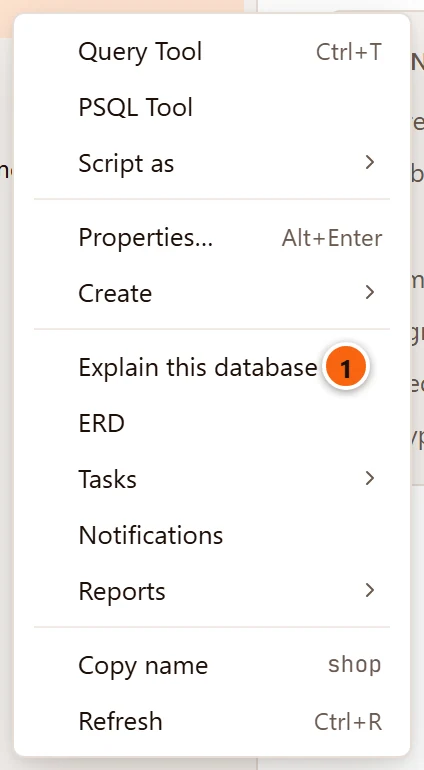
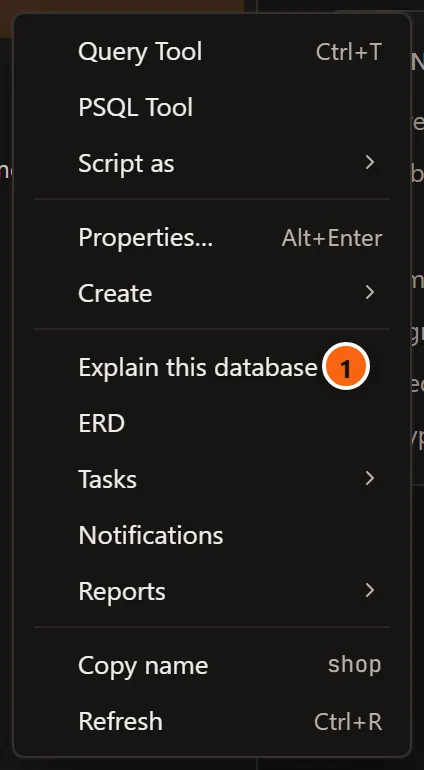
- 1 Explain this database. The rest of the menu is in Right-click menus.
A tab named Guide · shop (or Guide · shop.public for a schema) opens, or comes to the front if it is open. If pgjumbo has kept a guide for that database or schema, the tab shows it at once and the Assistant is not asked. If not, the Assistant pane comes forward and the Assistant is asked to write one. While the Assistant is still answering something else, nothing is asked: click Ask again in the tab when it is done.
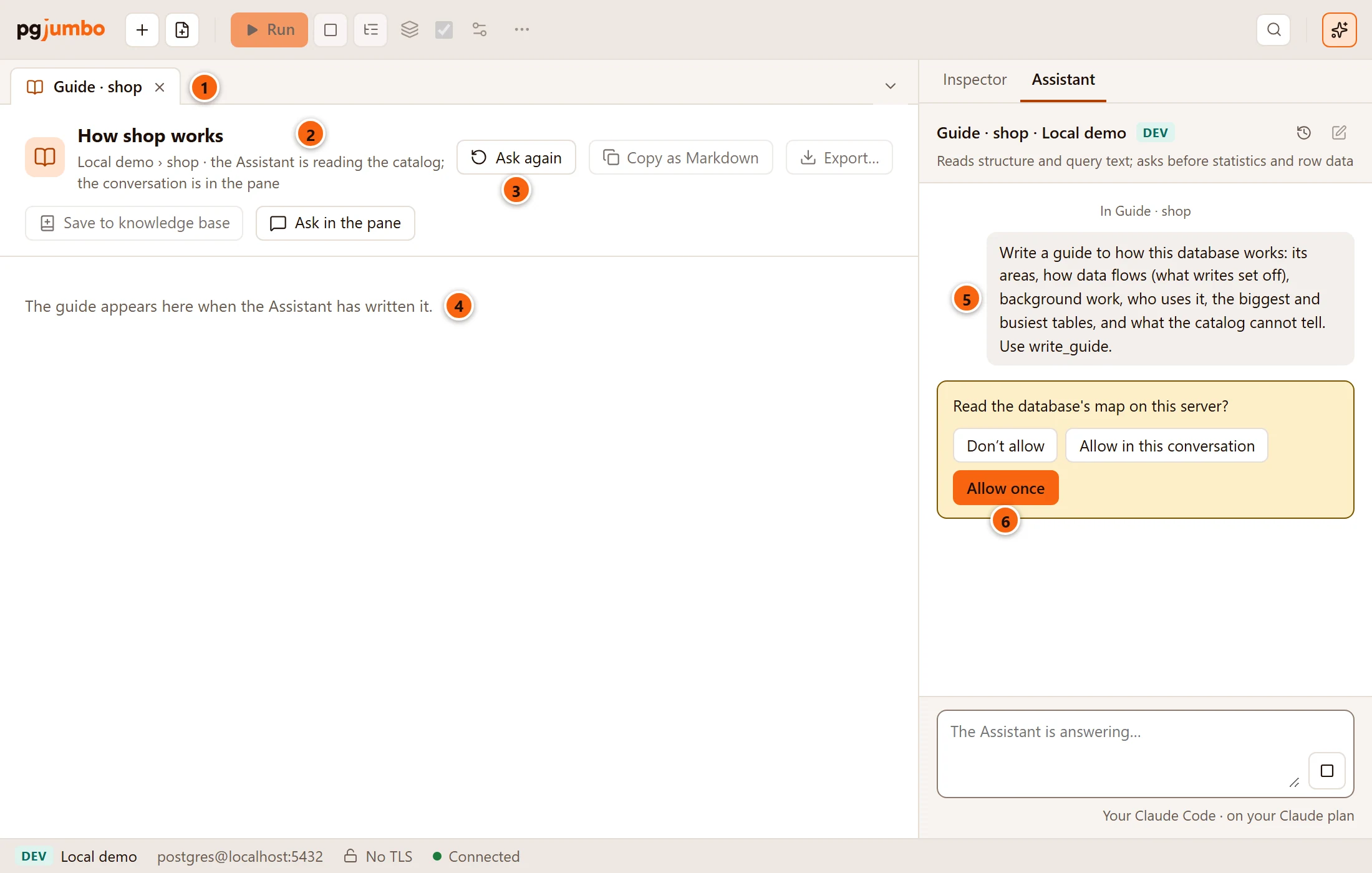
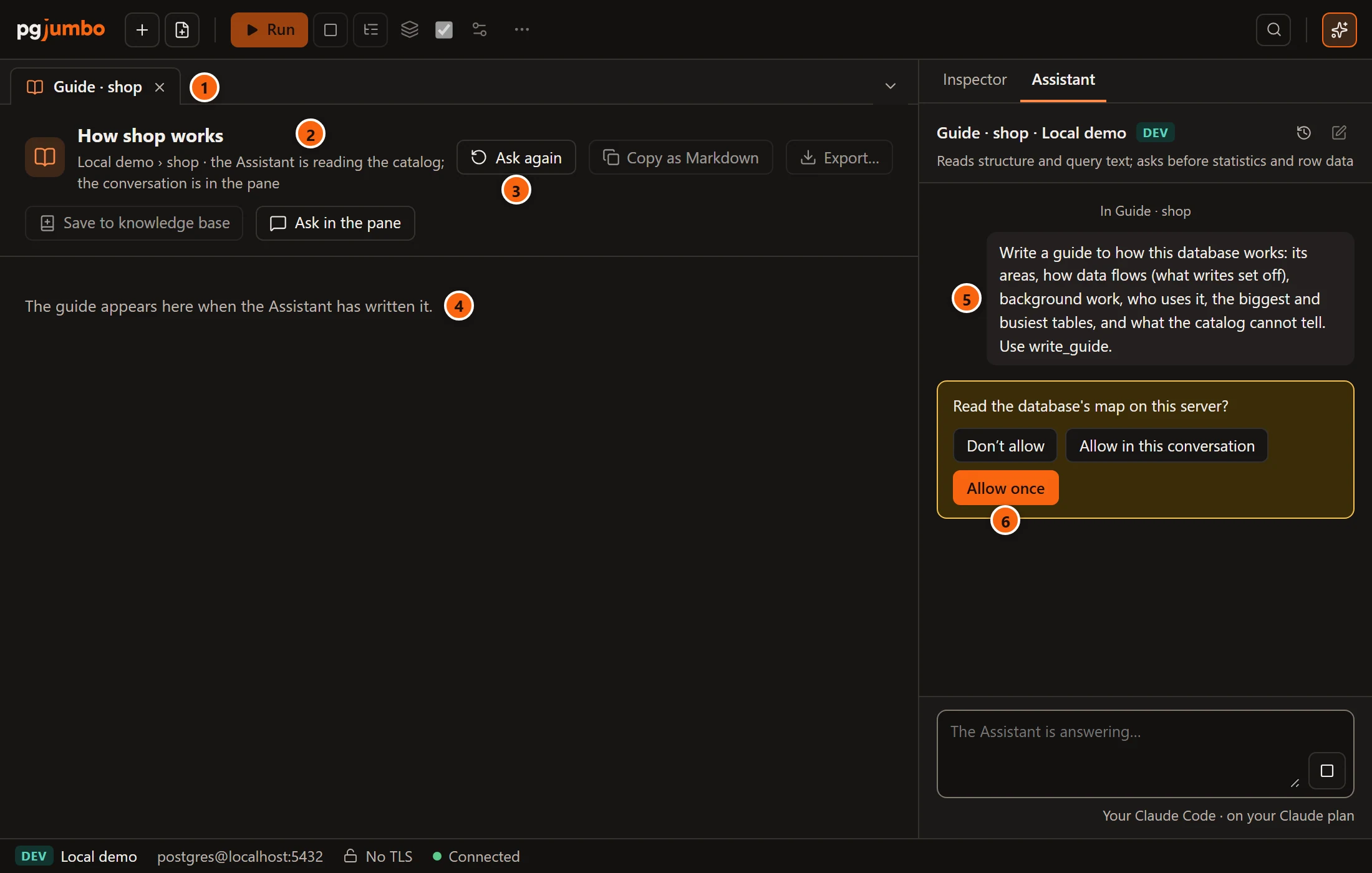
- 1 The guide’s tab in the tab strip.
- 2 Until the guide is written, the title is “How shop works” and the line under it says “the Assistant is reading the catalog; the conversation is in the pane”.
- 3 Ask again asks the same question again, for example after you stopped the answer.
- 4 The tab says “The guide appears here when the Assistant has written it.”
- 5 The question in the pane: a guide to the database’s areas, how data flows (what writes set off), background work, who uses it, its biggest and busiest tables, and what the catalog cannot tell. For a schema it also asks how the schema connects to the other schemas.
- 6 Each read follows the server’s access settings. Here, statistics on Dev servers are set to Ask, so the Assistant waits for Allow once, Allow in this conversation or Don’t allow. See Set up the Assistant.
What the Assistant reads
Section titled “What the Assistant reads”The Assistant reads structure and statistics, never rows:
| Read | Its access level | What it gives |
|---|---|---|
| The database’s map | Statistics | Each schema’s tables with their estimated rows, size, primary key, foreign keys with their ON DELETE, partitions, triggers, row security and comments; views and materialized views with the tables they read; functions, procedures and aggregates by signature, with what they return and their language; then extensions, publications and subscriptions. Above 300 tables it lists the 300 largest, and the Assistant reads the rest one schema at a time. A schema’s guide reads that schema only. |
| What a write sets off | Structure | For one table and an INSERT, UPDATE or DELETE, in the order PostgreSQL applies it: defaults, identity and generated columns, the partition a row lands in, INSTEAD OF and BEFORE triggers, row security and its policies, constraints, AFTER triggers, foreign-key actions into other tables (three deep), and the publications that carry the change. |
| An object’s definition | Structure | A view’s or function’s definition, where the guide needs it. |
| What changed since the last guide | Structure | On Read again: the kept guide, its date and what changed in the catalog since. |
The Assistant is told to write only what these facts show and to list what it could not work out as open questions. When it is done, the pane says “The guide “How shop works” is written; it is in its tab.” If you closed the guide’s tab in the meantime, it opens again.
Read the guide
Section titled “Read the guide”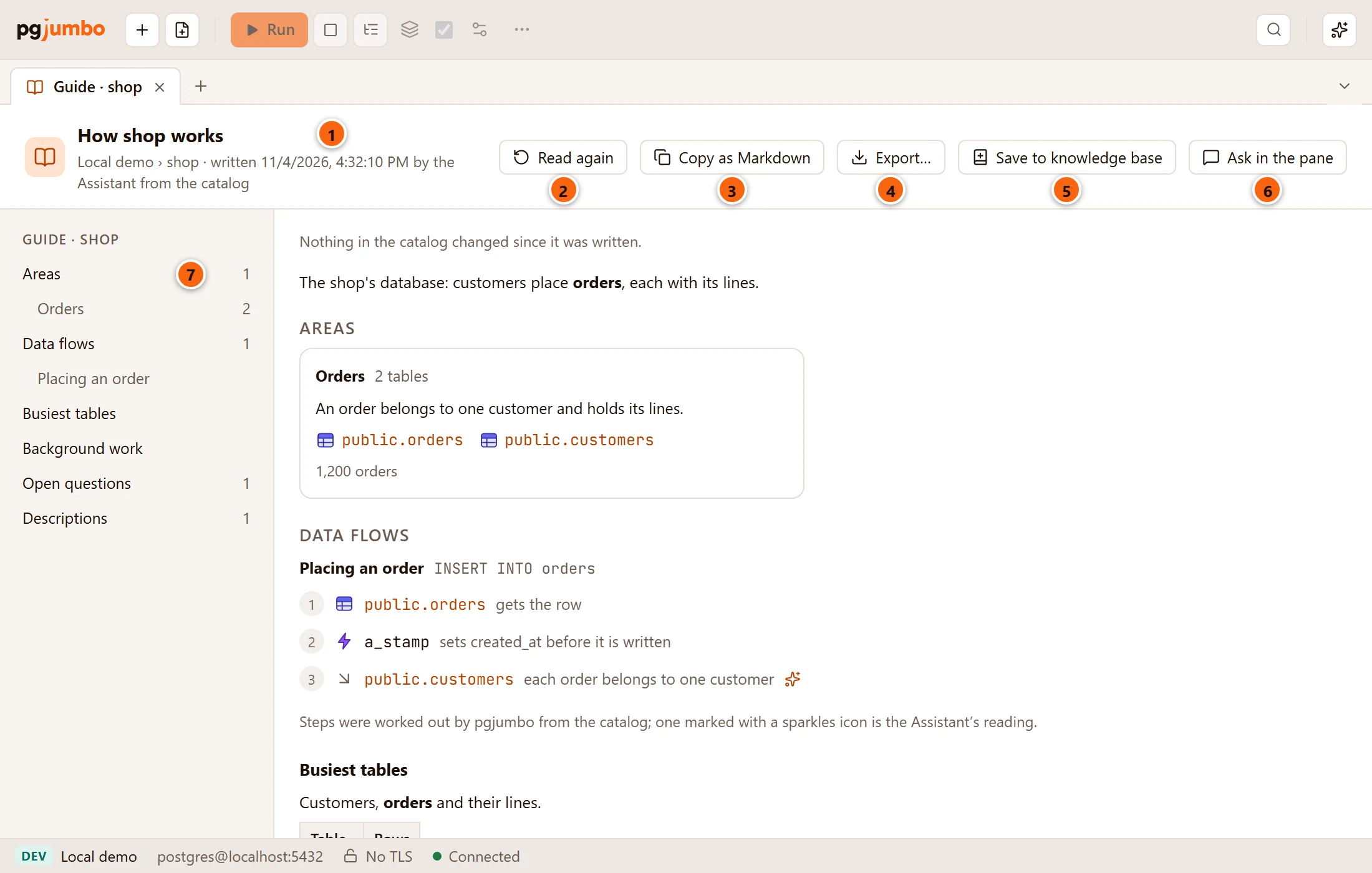
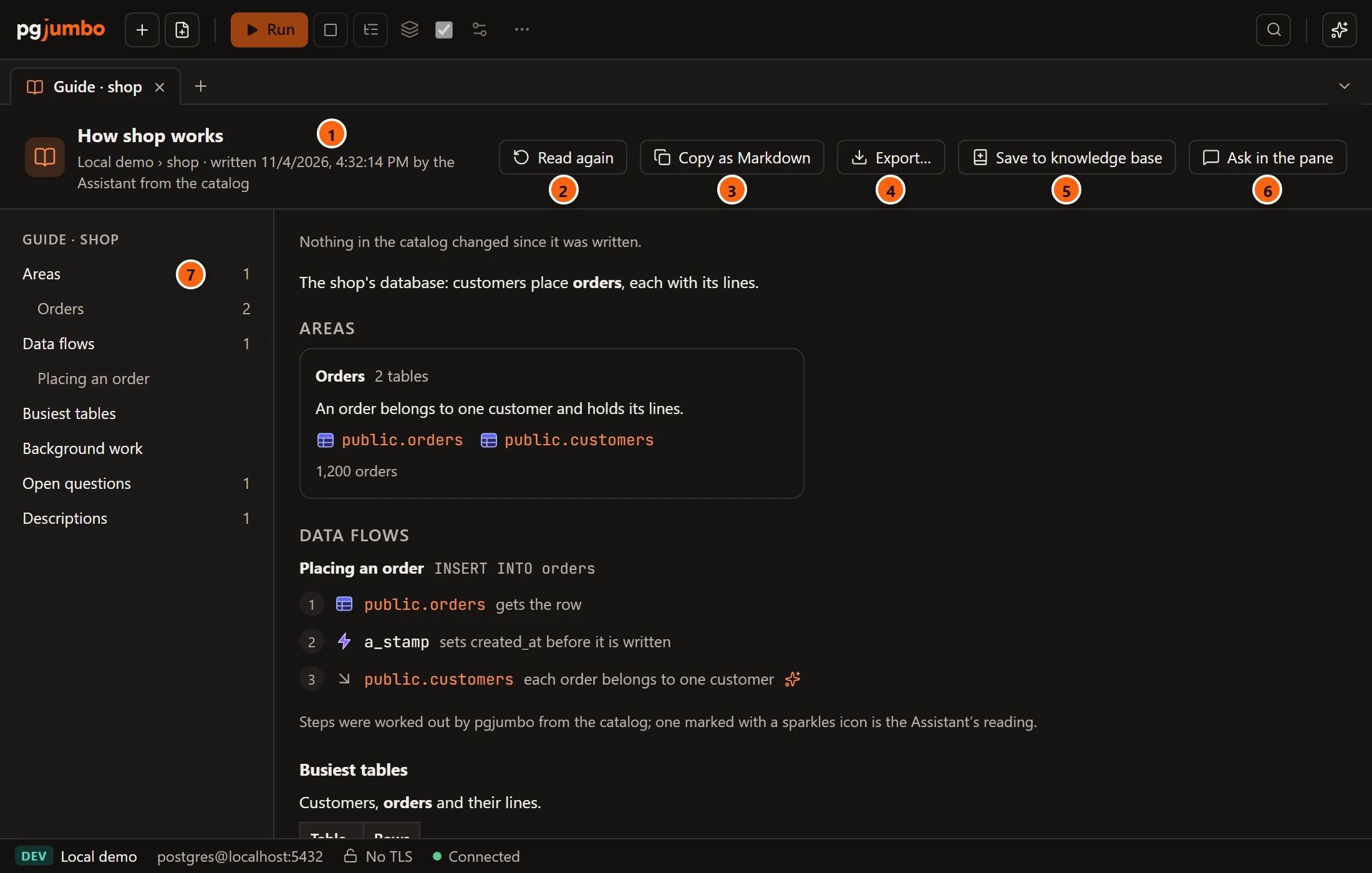
- 1 The guide’s title, then the server, database (and schema), when it was written, in your computer’s time, and “by the Assistant from the catalog”.
- 2 Read again: see Bring a guide up to date.
- 3 Copy as Markdown copies the whole guide as one Markdown document; the button then says Copied.
- 4 Export…: see Export or save the guide.
- 5 Save to knowledge base: see Export or save the guide.
- 6 Ask in the pane shows the Assistant pane, to ask about the guide. Questions asked while the guide’s tab is in front are about its database.
- 7 The contents, headed Guide · shop: Areas and Data flows with each area and flow under them, each section, Open questions and Descriptions, with their counts. Click an entry to scroll to it. The list shows when the tab is wide enough; hide the Explorer or the side pane to make room.
The guide’s body, from the top:
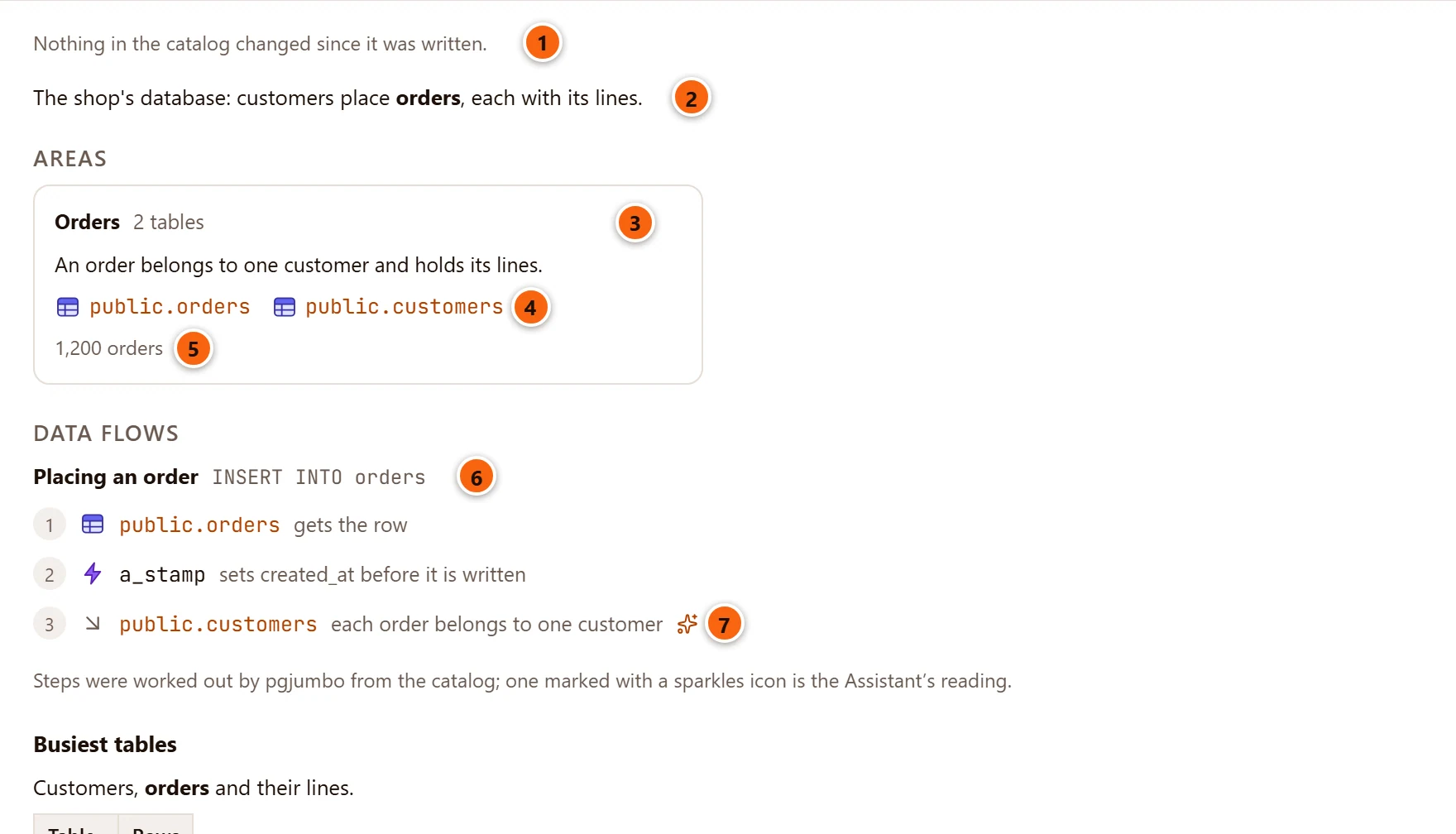
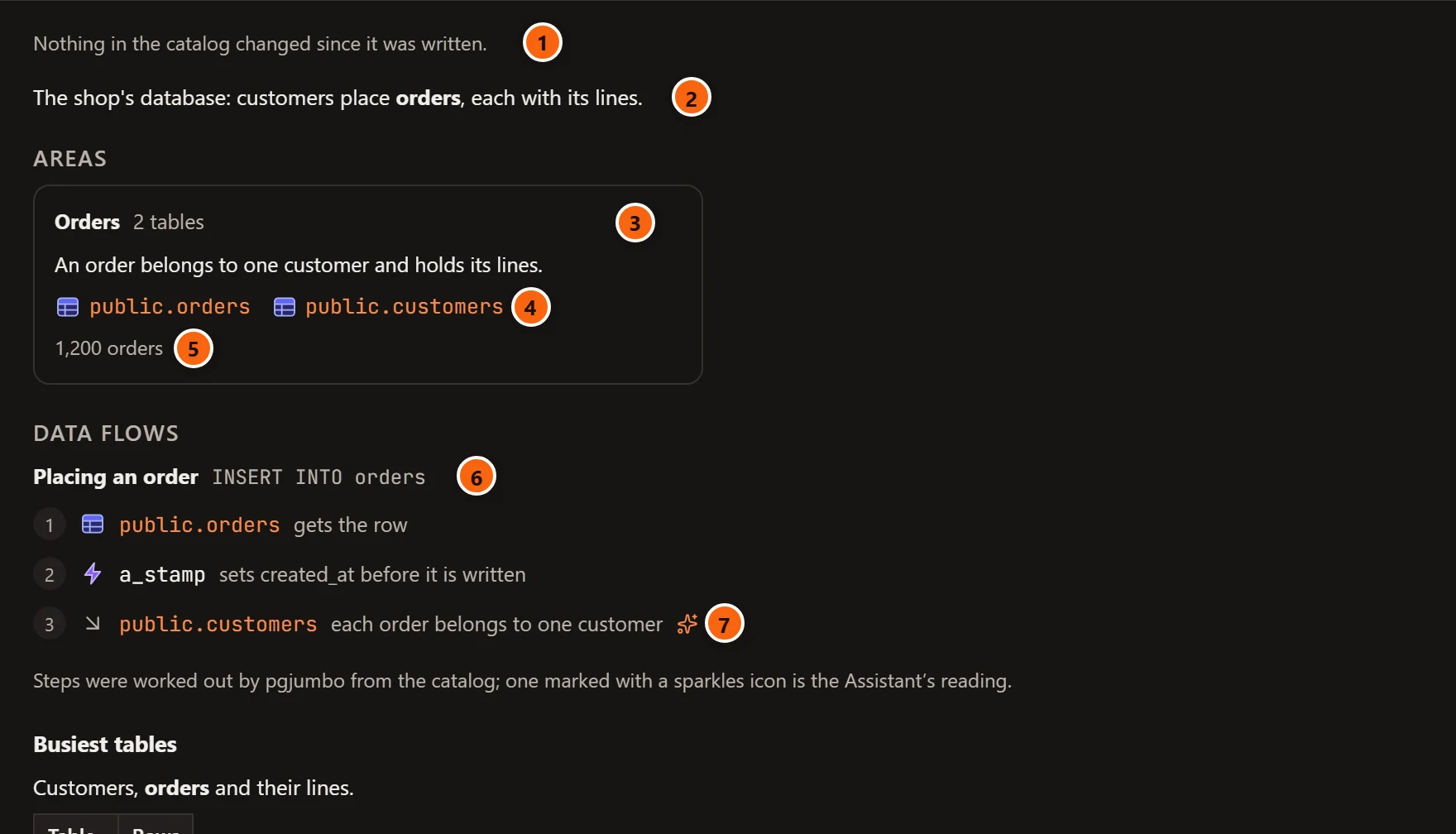
- 1 What changed in the catalog since the guide was written; see Bring a guide up to date.
- 2 The summary: what the database is for, in a few sentences.
- 3 An area: tables that belong together, with its name and how many tables it has, then a sentence or two about it.
- 4 The area’s main tables. A table’s name is a link that opens its tab (see the links below); a table added since the guide was written has a New tag.
- 5 Short facts about the area, such as its size or rows a day.
- 6 A data flow: a name, the statement that starts it (here
INSERT INTO orders), then numbered steps. Each step has an icon for its kind (a table, trigger, function, default, identity or generated column, check, cascade into another table, partition, policy or publication; a plain circle for anything else), the object’s name and what it does. A step whose object was changed, renamed or added since the guide was written has a Changed tag. - 7 A step marked with the sparkles icon is the Assistant’s own reading, not a fact the catalog showed. The note under the flows says so: “Steps were worked out by pgjumbo from the catalog; one marked with a sparkles icon is the Assistant’s reading.”
Further down come the guide’s sections, its open questions and the descriptions it offers:
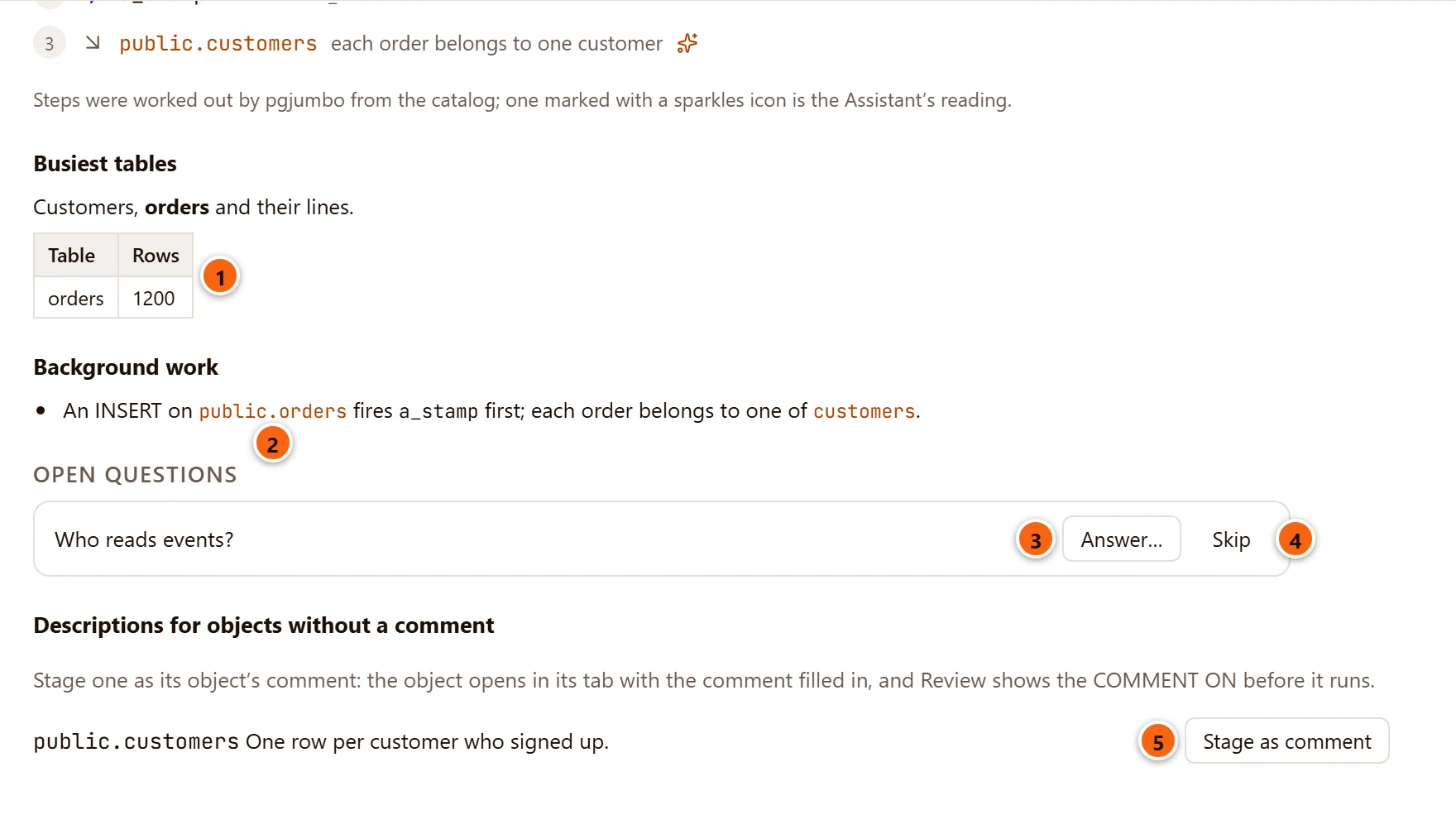
- 1 A section, written in Markdown: paragraphs, lists, tables and code. A guide has at most 30 sections.
- 2 An object’s name in
codelinks to its tab when pgjumbo finds the object in the catalog. Tables, partitioned tables, views, materialized views, functions and procedures link; a name written without its schema links only when one object has it. Other names, such as a trigger’s, are plain text. The same goes for the tables of an area and the names in a data flow. When an object cannot be opened (it was dropped since, for example), a line under the header says why. - 3 Answer… under an open question, something the catalog could not tell; see Answer the open questions.
- 4 Skip hides the question, and the count in the contents drops. The question comes back when you close the guide’s tab and open the guide again.
- 5 Stage as comment, beside a description the guide offers for an object that has no comment; see Stage a description as a comment.
The guide is text pgjumbo draws, never a web page from the database: names, comments and every other piece of database content show as plain text.
Answer the open questions
Section titled “Answer the open questions”Click Answer… to type what you know.


- 1 Your answer.
- 2 Send (or Enter) brings the pane forward and sends your answer to the Assistant: “About the guide’s open question “Who reads events?”: …”, asking it to use the answer and to write the guide again if it changes it. Send is greyed out while the field is empty. The question then says “Sent to the Assistant”, with Skip beside it.
- 3 Cancel closes the field.
When the Assistant writes the guide again, the new guide replaces the one in the tab.
Stage a description as a comment
Section titled “Stage a description as a comment”Descriptions for objects without a comment lists one-line descriptions the Assistant offers for important objects that have none, at most 50. Stage as comment opens the object’s tab with the description filled in as its comment, and the button then says Staged. It is greyed out unless the object is a table, partitioned table, view, materialized view, function or procedure that pgjumbo finds in the catalog.
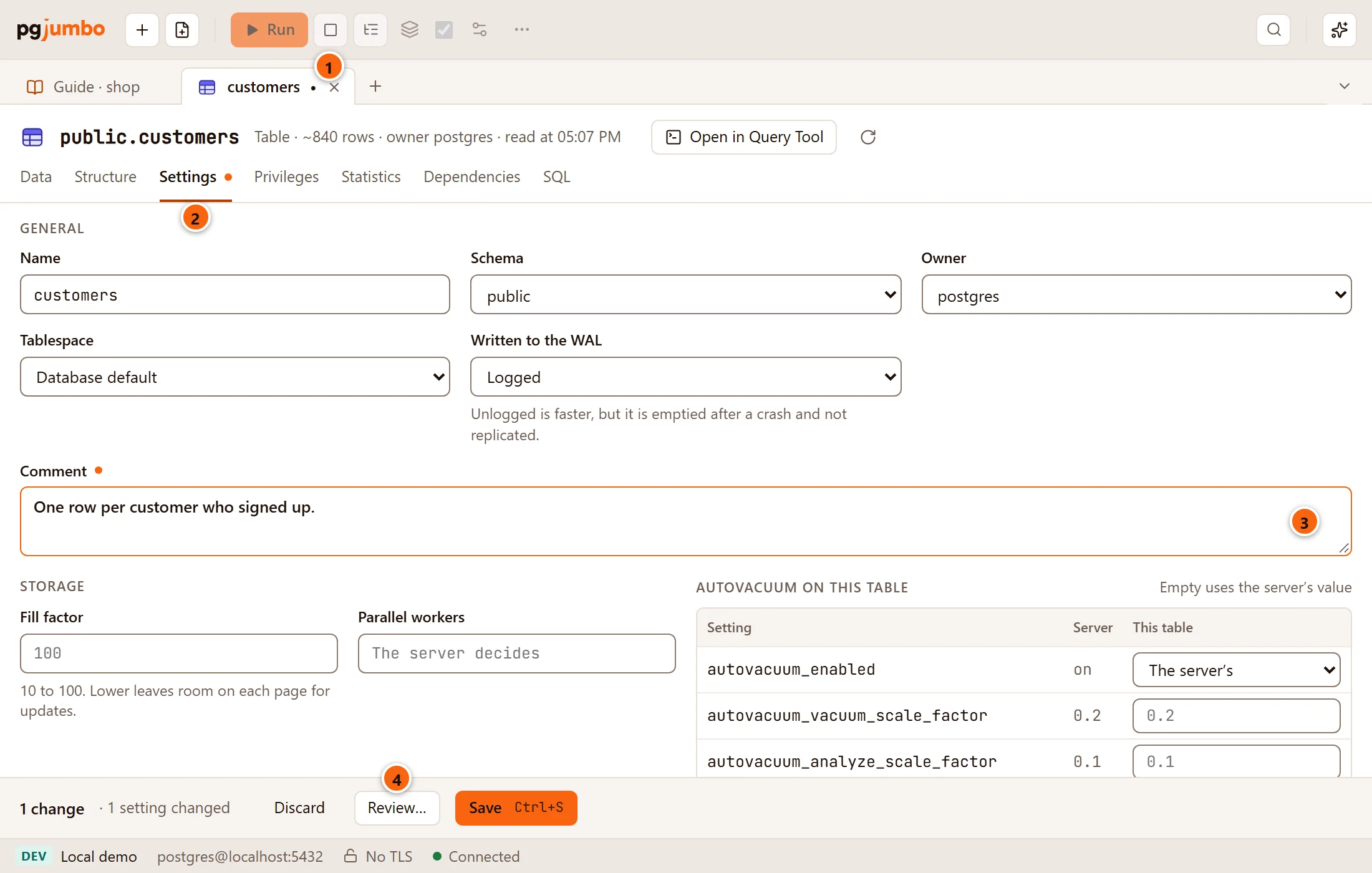
- 1 The object’s tab, opened beside the guide.
- 2 A table opens on Settings, where its comment is; a view, materialized view, function or procedure opens on General. The dot marks the staged change.
- 3 The comment, filled in. Change it as you like.
- 4 Review… shows the
COMMENT ONstatement before it runs, and Save runs it. Nothing has run yet; Discard drops it. See Object tabs and review.
Bring a guide up to date
Section titled “Bring a guide up to date”pgjumbo keeps the last guide written for each server, database and schema, with a record of the catalog at that moment: the tables, partitions, views, materialized views, functions, procedures, extensions and publications, and a fingerprint of each one’s definition. Comments are left out of the fingerprint, so a comment you stage from the guide does not count as a change. When you open the guide again and the server is connected, the top of the guide compares that record with the catalog now:
| The guide says | What it means |
|---|---|
| Nothing in the catalog changed since it was written. | Every object it recorded is still there, under the same name and with the same definition, and none was added. |
| The catalog changed since this guide was written: 1 added, 2 changed, 1 removed. Read again brings the guide up to date. | Below it, a list of what changed, added first and removed last, such as “added table public.refunds”, “changed view public.open_orders”, “renamed table public.clients (was public.customers)” or “removed function public.old_total(integer)”: up to 12, then “and N more”. |
| Nothing | Nothing was compared: the server is not connected, or pgjumbo could not read the catalog when the guide was written. |
An object counts as renamed when it keeps its identity under a new name, and as changed when its definition differs (also when it was dropped and made again differently). One dropped and made again exactly as before does not count. A schema’s guide compares only that schema’s objects.
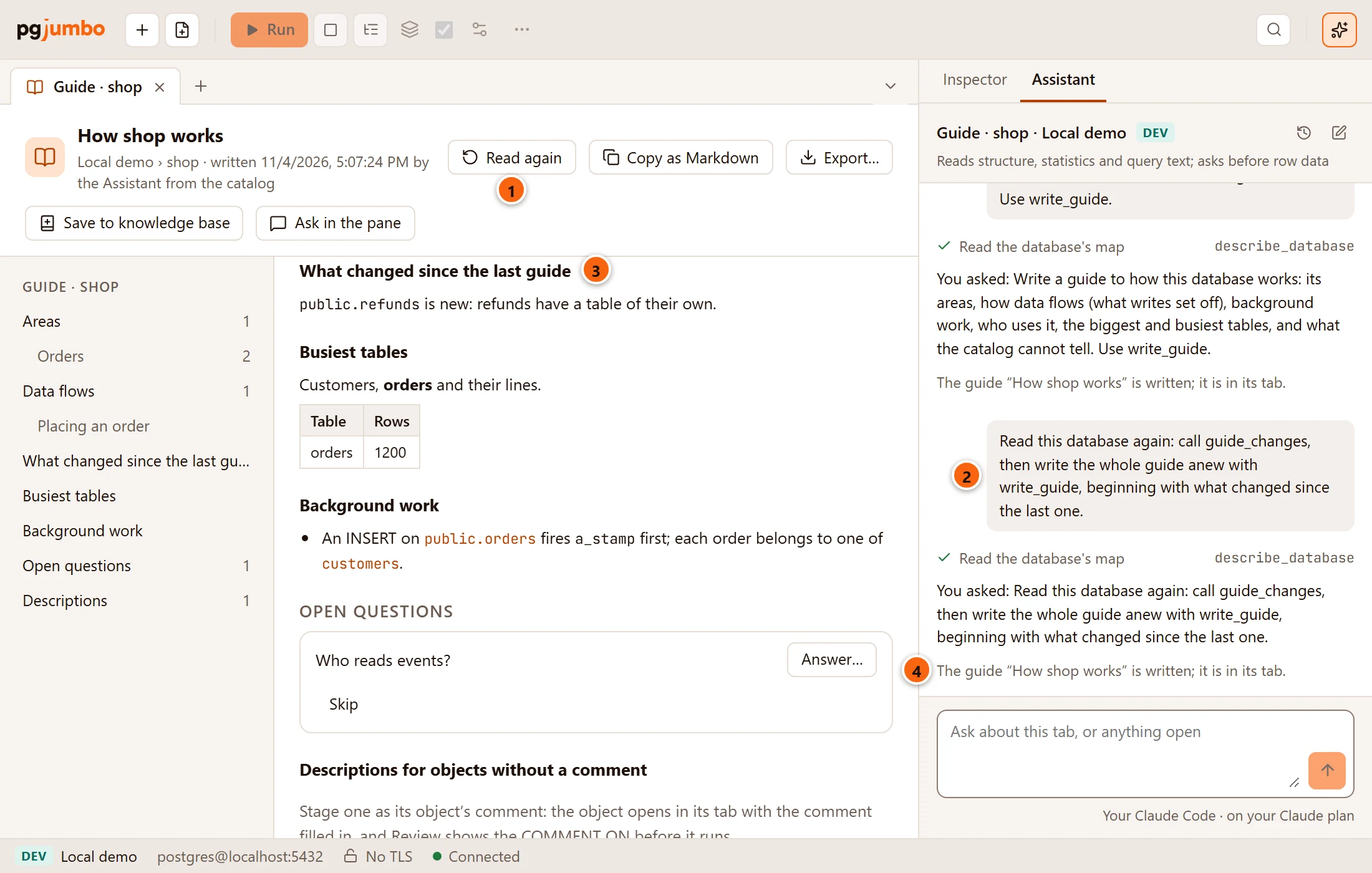
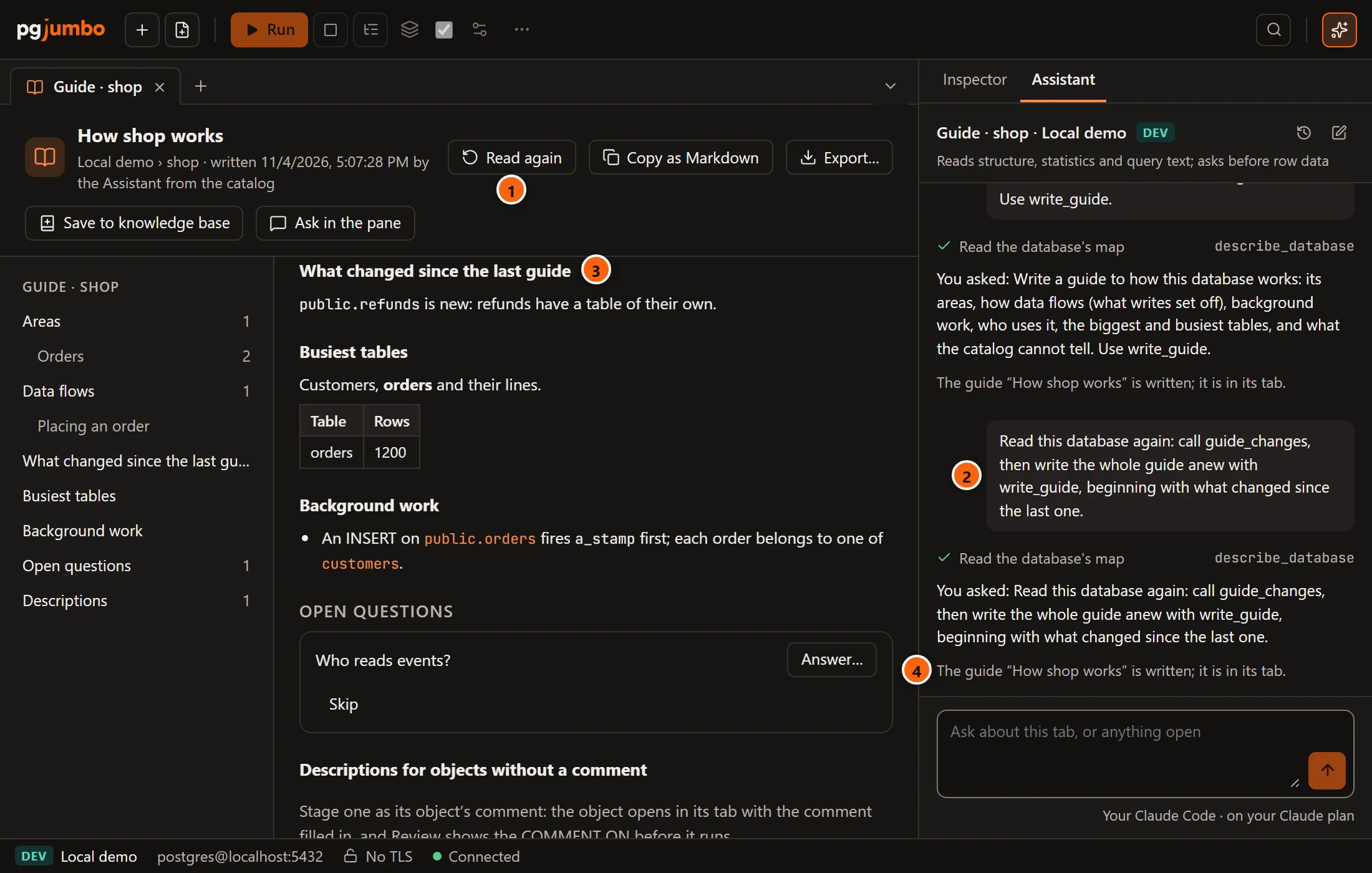
Read again brings the pane forward and asks the Assistant to read the database (or the schema) again: it first reads what changed since the last guide, then writes the whole guide anew, beginning with a section on what changed.
- 1 Read again.
- 2 The question it asks in the pane.
- 3 The new guide begins with what changed since the last one.
- 4 The pane says when the guide is written. The new guide replaces the old one in the tab and in what pgjumbo keeps; there is one guide per database and per schema. A question you skipped stays hidden if the new guide asks it again in the same words.
Export or save the guide
Section titled “Export or save the guide”

- 1 Export… shows your system’s Export Guide dialog, suggesting
shop-guide.md(orshop-public-guide.mdfor a schema), and writes the guide there as Markdown. The button then says Exported; hold the pointer over it to see where the file went. Cancelling the dialog writes nothing. - 2 Save to knowledge base writes the guide into the Assistant’s knowledge base, where later conversations find it. The button then says In knowledge base, and clicking it opens that file in a tab of its own.
Copy as Markdown, Export… and Save to knowledge base all give the same document: the title, the server and
database (Local demo › shop), the summary, Areas (each with its tables and facts), Data flows (each step
numbered, with its kind, and “(the Assistant’s reading)” where it is), the sections, Questions the catalog could not
answer and Descriptions for objects without a comment. It holds the guide as it was written: questions you skipped
are in it, and what changed since is not. The three buttons are greyed out until a guide is written. When
Export… or Save to knowledge base fails, for example because the file cannot be written, the reason shows in a
line under the header.
In the knowledge base the guide goes to databases/<server>/<database>-guide.md, or
databases/<server>/<database>.<schema>-guide.md for a schema. Names are written in lower case, with each run of
characters other than letters, digits and _ turned into one -: Local demo becomes local-demo. Hold the pointer
over the button to see the path. Its label says where things stand:
| The button says | What it means |
|---|---|
| Save to knowledge base | No such file yet. |
| Update in knowledge base | The file exists but differs from the guide shown, because the guide was written again or the file was edited. Clicking replaces the file with the guide. |
| In knowledge base | The file holds this guide. Clicking opens it. |